


TL;DR
|
An immutable backup ransomware restore drill answers one question. If an attacker holds every production password tonight, can your team still restore clean data tomorrow? Two alerts from the last four weeks show why that question deserves a tested answer.
This guide is intended for IT heads, infrastructure leads and security teams at Indian enterprises that already have backup systems in place and want to strengthen their ransomware recovery capabilities. It covers the key elements of a reliable backup strategy, including access controls, retention policies, offline copies, log retention and scheduled restore drills with documented results. Our earlier primer on why it is important to back up your data explains the fundamentals of data backup. This guide builds on those basics and focuses on making backups secure, recoverable and ready for ransomware incidents.
What the October and November 2026 Advisories Mean for Backup Security
Both alerts ask for offline or immutable backups and for regular testing of backup restoration.
On 20 October 2026, the Federal Bureau of Investigation (FBI), the Cybersecurity and Infrastructure Security Agency (CISA), the US Secret Service and German and UK law enforcement agencies published joint advisory AA26-293A. It reports that SafePay actors have been active since August 2024 and have impacted at least 600 victims. According to the advisory, the actors halt the Volume Shadow Copy Service and reset NAS devices holding backup data to factory settings. In some cases they deleted all network-attached backups of company data.
The advisory’s mitigations turn to backups directly. They ask organisations to maintain offline backups and regularly test backup and restoration. Backup data should also be encrypted, immutable and cover the whole data estate, with multiple copies in a physically separate, segmented location.
On 2 November 2026, the Hong Kong Computer Emergency Response Team Coordination Centre (HKCERT) issued an alert on ransomware hitting Synology NAS devices. In that alert, HKCERT recommends offline or immutable backups and regular tests of restoration procedures. The same day, BleepingComputer reported Synology’s warning that attackers were exploiting a flaw patched in December 2024.
Who owns patching for a NAS that is still missing a December 2024 fix? Our post on the emergency patching SLA for managed servers addresses that question.
The Indian rule that sits beside them
For Indian entities, the domestic rule is the CERT-In direction of 28 April 2022. It lists ransomware among the incident types that service providers, data centres, body corporate and government organisations must report within 6 hours. The same direction sets the log retention rule covered in Step 4.
The table below also draws on the UK National Cyber Security Centre (NCSC) principles covered in Step 1.
| Source | What it asks for | Build step in this guide |
|---|---|---|
| CISA and partners, AA26-293A | Offline backups, encrypted and immutable backup data, separate and segmented copies, regular restore tests | Steps 1 to 3 and the restore drill |
| HKCERT, 2 Nov 2026 | Offline or immutable backups, regular restoration tests, restore only after the environment is secured | Step 3 and the restore drill |
| NCSC, cloud backup principles | No destructive requests from customer accounts, alerts on privileged actions, retention by time period | Steps 1, 2 and 4 |
| CERT-In directions, 28 Apr 2022 | Logs of all ICT systems for a rolling 180 days in India, 6-hour incident reporting, clock sync | Step 4 |
Read across the first three rows and one pattern stands out: CISA, HKCERT and the NCSC each ask for offline, immutable or destruction-resistant backups. The build steps below start with who can touch the backups.
Sources: CISA AA26-293A (20 Oct 2026); HKCERT (2 Nov 2026); NCSC ransomware-resistant cloud backups; CERT-In directions (28 Apr 2022).
Building Immutable Backups: Access Controls, Object Lock and Offline Copies
The build has four parts. Does the backup system trust the same accounts as production?
Step 1. A separate backup identity
The SafePay advisory describes actors who create new accounts or take over existing ones once inside the network. Does the backup estate have a separate backup identity that production admin accounts cannot use, reset or impersonate?
The NCSC goes further in its principles for ransomware-resistant cloud backups. It suggests forbidding destructive requests from customer accounts, including administrative users and backup agents. Exceptional deletions are then authorised out-of-band through a mechanism agreed in advance.
It also suggests forbidding any identity and access management policy that restricts access to a single account within an attacker’s control. An attacker must then undermine several accounts to control the backup system.
WHAT TO VERIFY
|
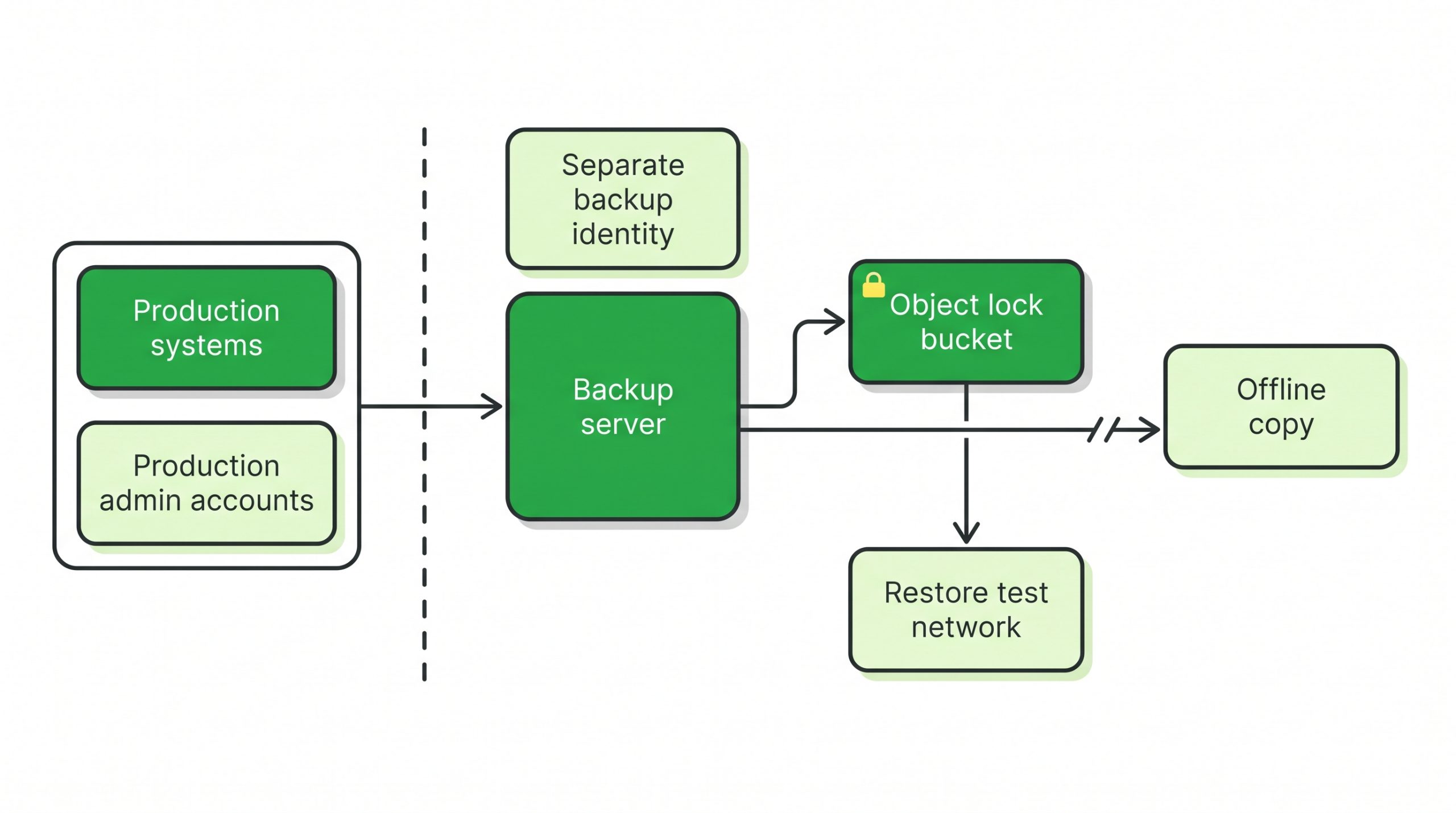
Figure 1. Production admin accounts have no path into the backup estate. A separate backup identity manages the object lock bucket, the offline copy and the restore test network.
Step 2. Choosing the lock mode
Object lock is a write-once, read-many (WORM) setting on Amazon Simple Storage Service (S3)-compatible object storage. The mode matters, because only one mode removes the administrator’s ability to undo it.
The MinIO AIStor documentation describes the modes for its own product. Under GOVERNANCE mode, users with the s3:BypassGovernanceRetention permission can modify the object or lift the lock. Under COMPLIANCE mode, no user can modify the object or its settings, including the root user, until the retention period passes.
A legal hold is indefinite, and only users with the s3:PutObjectLegalHold permission can set or lift it. MinIO also notes that object locking requires versioning, and that creating a bucket with object locking enabled turns versioning on automatically.
| Lock type | Who can change or remove it early | Question to decide |
|---|---|---|
| GOVERNANCE mode | Users holding the bypass permission | Who holds that permission, and is it outside production identity? |
| COMPLIANCE mode | No user, including root | Is the retention period short enough to live with if set wrongly? |
| Legal hold | Users holding the legal hold permission | Which incidents or disputes trigger a hold, and who approves it? |
Who holds the bypass permission in GOVERNANCE mode, and is that identity separate from the one in Step 1?
Source: MinIO AIStor documentation, Object Locking and Immutability.
Setting retention and the bucket
The Ceph Object Gateway documentation enables object lock through the x-amz-bucket-object-lock-enabled header when the bucket is created. In Ceph, applying a lock configuration to a bucket created without it returns an InvalidBucketState error. The default retention rule is then set in days or years.
How long to keep each version is a risk decision. The NCSC suggests storing backups for a fixed time period rather than a fixed number of copies. That way an attacker cannot push out clean versions by writing a quick series of corrupted ones.
The CISA guide adds a caution. It says immutable storage may not meet the compliance criteria of certain regulations and that misconfiguration can be costly. In MinIO AIStor, a COMPLIANCE lock set for years by mistake cannot be changed or removed before the configured retention period has passed.
Clock sync under CERT-In
MinIO AIStor computes retention dates from the server’s system clock by default. It accepts a remote Network Time Protocol (NTP) server as the time source instead.
The CERT-In direction requires ICT systems to sync clocks with the NTP servers of the National Informatics Centre (NIC) or the National Physical Laboratory (NPL). It also accepts servers traceable to them. Does the object store take its retention time from an NTP source traceable to NIC or NPL?
Step 3. One offline copy
An object lock bucket is still online. The CISA guide asks for offline, encrypted backups of critical data because many ransomware variants try to find and delete or encrypt accessible backups.
An offline copy has no standing network path from production. HKCERT’s alert explains why a live link is a risk. On a suspected infection, it tells users to disconnect the NAS and suspend connected synchronisation and backup jobs, so that other backups are not affected.
The CISA guide also asks for more than data in that copy. It asks organisations to maintain golden images of critical systems and to keep backups of infrastructure-as-code template files offline. It also asks them to store source code or executables with offline backups. CISA says rebuilding from system images is more efficient, but some images will not install correctly on different hardware or platforms, so separate access to software helps.
WHAT TO VERIFY
|
Step 4. Logs of the backup system for 180 days in India
The CERT-In direction asks every covered entity to enable logs of all its ICT systems and keep them securely for a rolling 180 days within Indian jurisdiction. Those logs go to CERT-In with any incident report or on its order. Because the rule covers all ICT systems, the backup server, the object store and the backup identity provider fall inside it.
The NCSC’s fifth principle asks for alerts when significant changes are made or privileged actions are attempted. Does a failed delete on a locked version raise an alert to the backup owner?
Where are the backup system’s logs written, and can production admin accounts delete them? Does the backup hold personal data that falls under the Digital Personal Data Protection (DPDP) Rules? Our DPDP Rules backup and breach response checklist covers them.
Running an Immutable Backup Ransomware Restore Drill with a Pass Sheet
A restore drill is a timed recovery from the locked or offline copy into an isolated network, judged against a written pass sheet. Does the drill show that the data comes back intact and that the restore runs without production credentials?
The method below is this guide’s proposal; CISA, the NCSC and HKCERT set only the principle. CISA asks organisations to test the availability and integrity of backups in a disaster recovery scenario. For its part, the NCSC describes restore tests that do not disturb existing infrastructure and that can detect a corrupted backup. HKCERT adds the order for a real incident: restore from verified clean backups only after the environment has been secured.
The five drill steps
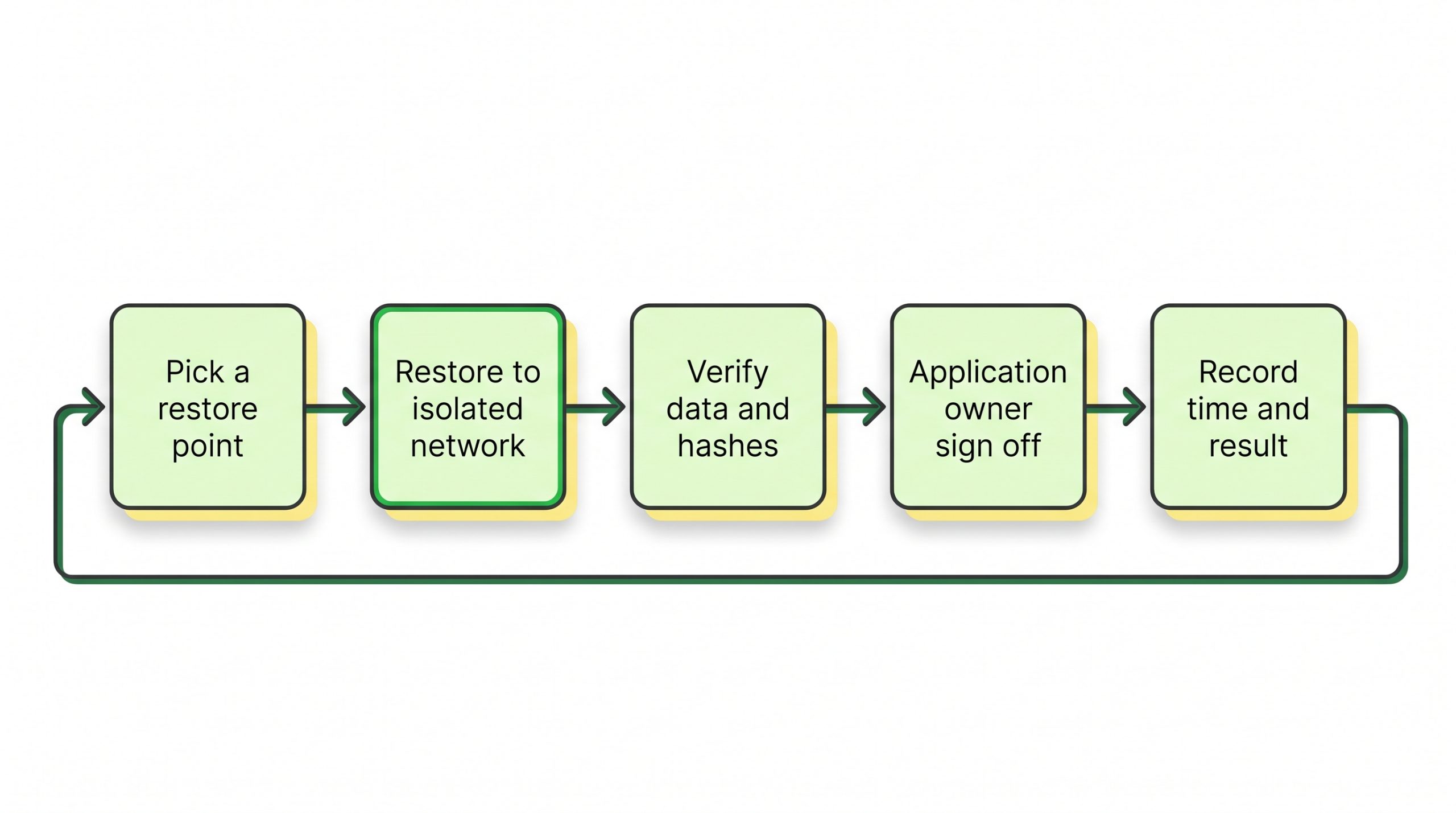
Figure 2. One drill runs in five steps: pick a restore point, restore to isolated network, verify data and hashes, application owner sign off, then record time and result before the next cycle.
The team first picks a restore point at random from the locked bucket or the offline copy, not the newest one. It then restores to isolated network segments. The CISA guide warns against re-infecting clean systems and suggests that a recovery Virtual Local Area Network (VLAN) takes only clean systems.
After that, the team verifies data and hashes and asks the application owner to sign off that the system works. Finally, it records time and result against the recovery point objective (RPO) and RTO.
The pass sheet
| Pass sheet check | Pass condition | Evidence to keep |
|---|---|---|
| Immutability test | An attempt to delete a locked version fails with an error | Command output with timestamp |
| Credential test | The restore runs with the separate backup identity only | Login records from the backup console |
| Isolation | Restored systems sit on an isolated network with no route to production | Firewall rule export for the drill |
| Restore point age | The newest clean point is within the agreed RPO | Backup catalogue entry for the chosen point |
| Integrity | File hashes or database row counts match the source record | Hash list or query output |
| Application check | The application owner confirms that a business transaction completes | Signed sign-off with name and date |
| Recovery time | Elapsed time from start to sign-off is within the agreed RTO | Start and end timestamps on the sheet |
| Logs | Drill events appear in the backup system logs kept for 180 days | Log export reference |
A drill passes only when every row passes. The hub’s managed services checklist shows how RPO, RTO and restore testing split between you and a provider.
Sources: CISA #StopRansomware Guide; NCSC ransomware-resistant cloud backups; HKCERT (2 Nov 2026); MinIO AIStor documentation.
Where This Build Stops Short
Immutability protects backup copies from change. It does not decide whether the data inside them was already compromised, and it does nothing about data that has already left the building.
The SafePay advisory describes actors who exfiltrate data before they encrypt it and then post it on a leak site if the victim does not pay. A clean restore brings operations back, but it does not recall stolen data. That side of an incident sits with breach response and reporting, including the 6-hour CERT-In clock.
Restore points need judgement too. If an intrusion started before the oldest locked version, the lock preserves an infected copy. How far back does a known clean point exist, and does the retention period reach past it?
Finally, COMPLIANCE mode trades flexibility for certainty, since a wrong retention period cannot be shortened. The CISA guide cautions that immutable storage does not meet the compliance criteria of certain regulations.
| Criterion | Why it matters | What to verify |
|---|---|---|
| Separate backup identity | Advisory AA26-293A describes account takeover inside the network | No production admin can log in to backup systems |
| Object lock mode | COMPLIANCE mode blocks changes even by the root user | Mode, retention period and who holds bypass rights |
| Offline copy | CISA asks for offline backups; HKCERT asks for offline or immutable backups | Medium, last disconnect date and retrieval time |
| 180-day logs in India | CERT-In covers logs of all ICT systems | Log location, retention and delete rights |
| Clock sync | Retention dates follow the server clock | NTP source traceable to NIC or NPL |
| Restore drill | Both advisories ask for regular restore tests | Signed pass sheet with times against RPO and RTO |
Making Backups Survive a Stolen Admin Password
A backup resists ransomware when the attacker’s credentials cannot delete it, the lock cannot be shortened, one copy sits offline, and a signed drill proves the restore works.
This build suits enterprises with production data on several systems and a backup team distinct from server admins. Where one person administers both production and backups, the identity split in Step 1 cannot hold, so separating the roles comes before any storage change.
| NEXT STEP The pass sheet can go to the next backup review. If backup operations, monitoring and restore testing need a named owner outside your production team, review the scope of RackBank Managed Services for backup operations and compliance management against it. |
FAQs
What is the difference between governance mode and compliance mode in object lock?
In governance mode, users with a bypass permission can change retention or remove the lock. In compliance mode, no user can change or remove it before the retention period ends, including the root user. MinIO documents both modes as functionally identical to the S3 modes of the same name.
Does CERT-In require immutable backups?
The CERT-In directions of 28 April 2022 do not mention backups or immutability. They require 180-day log retention in India, 6-hour incident reporting and clock sync with NIC or NPL time servers. Immutable backups come from the CISA and HKCERT guidance, while the CERT-In rules shape the logs and reporting around them.
Can ransomware delete versioned backups in an S3 bucket?
Versioning alone keeps history, but MinIO notes that applications can still explicitly delete specific versions. In MinIO AIStor, an attempt to explicitly delete a locked version fails with an error. An unversioned delete on a locked object, by contrast, produces a delete marker, and the locked versions stay in the bucket.
Is an object lock bucket enough without an offline copy?
The SafePay advisory asks for offline backups, immutable backup data and copies in a physically separate, segmented location. An object lock bucket stays reachable over the network, and CISA asks for offline backups because many ransomware variants try to find and delete or encrypt accessible backups.


