


TL;DR
|
This guide explains the CERT-In 180 days log retention requirements servers must meet, including servers you run yourself. Those include a dedicated server you rent, hardware you colocate and machines in your own office. The directions name service providers, intermediaries, data centres, body corporate and government organisations. The CERT-In FAQ explains body corporate through section 43A of the Information Technology (IT) Act as any company, and includes a firm, sole proprietorship or other association of individuals engaged in commercial or professional activities.
This guide turns the directions into three practical outputs: the logs to switch on, a central store that keeps them, and the evidence pack to hand to an auditor or to CERT-In. It is written for IT heads, security leads and system admins at Indian companies.
Our data centre managed services checklist splits work across the facility, infrastructure and application layers. This post stays inside one slice of that split: the logs, and who can prove they exist.
What do the CERT-In 180 days log retention requirements say?
The directions ask for four things that touch a server. Direction (iv) asks covered entities to enable logs of all their ICT systems and keep them securely for a rolling 180 days within Indian jurisdiction. The same direction says these logs go to CERT-In with an incident report, or when CERT-In orders them. Three other directions bear on logs: time synchronisation, incident reporting and the Point of Contact.
| Duty | What the directions say | What it means on your servers |
|---|---|---|
| Log retention, Direction (iv) | Logs of all ICT systems, kept securely for a rolling 180 days within Indian jurisdiction | Every server, firewall and application that records events feeds a store that holds at least 180 days |
| Time sync, Direction (i) | Connect to the Network Time Protocol (NTP) server of NIC or NPL, or NTP servers traceable to them | Every server’s time client follows NIC or NPL, directly or through your own NTP server |
| Incident reporting, Direction (ii) | Report Annexure I incidents within 6 hours of noticing them | Can your team find the relevant log entries inside that window? |
| Point of Contact, Direction (iii) | Designate a Point of Contact and send the details in the Annexure II format | One named person receives CERT-In’s requests for logs and information |
| Start date | Effective 60 days after issue on 28 April 2022 | The directions took effect 60 days after their issue on 28 April 2022 |
Source: CERT-In, Directions under section 70B(6) of the IT Act, 28 April 2022.
The first column is the legal hook, and the last column is the work. The CERT-In FAQ also explains the clock rule. Without an accurate time stamp, it says, the sequence of events in an incident is extremely hard to rebuild.
Format and timeframe when CERT-In asks
Direction (iii) also shapes log design. When CERT-In orders information, the order may set the format, up to near real-time, and a timeframe. Missing that timeframe is treated as non-compliance. Can the log store export logs in the format and within the timeframe that a CERT-In order sets?
A 2026 reminder from CERT-In
The rule is not dormant. In a MediaNama interview published on 4 November 2026, CERT-In’s Director General restated the 180-day rule. He also named the complete AI agent activity transcript as a key record in incidents involving AI agents. Teams that run agents on their own servers can treat those transcripts as one more log source.
Subscriber records are a separate duty
One duty in the directions is easy to confuse with log retention. Direction (v) asks data centres, virtual private server (VPS) providers, cloud providers and VPN service providers to keep subscriber records for 5 years or longer after cancellation or withdrawal of the registration. Those are customer identity records held by providers, not your server logs. The CERT-In FAQ also says that an enterprise or corporate VPN is not a VPN service provider under that direction.
Which logs to keep on servers you run yourself
CERT-In does not publish a closed list. Its FAQ on the directions lists examples by sector: firewall, intrusion prevention, security information and event management (SIEM), web, database, mail, File Transfer Protocol (FTP) and proxy server logs. It adds event logs of critical systems, application logs, SSH logs and VPN logs.
The FAQ says the list is not exhaustive. It also says both successful and unsuccessful events should be recorded.
For a team that runs a handful of servers, that list maps to five groups. The table turns each group into a question your team can answer for every machine.
| Log group | Examples from the CERT-In FAQ | Question to answer per server |
|---|---|---|
| Operating system logs | Event logs of critical systems | Are logon failures recorded as well as logons? |
| SSH and VPN logs | SSH logs, VPN logs | Does each session show the user, source address, start and end? |
| Firewall logs | Firewall and intrusion prevention logs | Are blocked connections logged, not only allowed ones? |
| Application logs | Web, mail, FTP and proxy server logs, application logs | Do the panel, web server and application write an audit trail of admin actions? |
| Database logs | Database server logs | Are failed logins and privilege changes captured? |
Source: CERT-In, FAQs on Cyber Security Directions of 28.04.2022, Q37.
The first row is the one to check early. On Windows Server, for example, Microsoft documents that event 4625 is logged for any logon failure. So event 4625 covers one kind of unsuccessful event that the FAQ mentions.
Remote access deserves the same attention. The US National Institute of Standards and Technology (NIST) notes that VPN systems typically log successful and failed login attempts, connect and disconnect times, and the data sent in each session. Does your VPN or SSH gateway record at least that much?
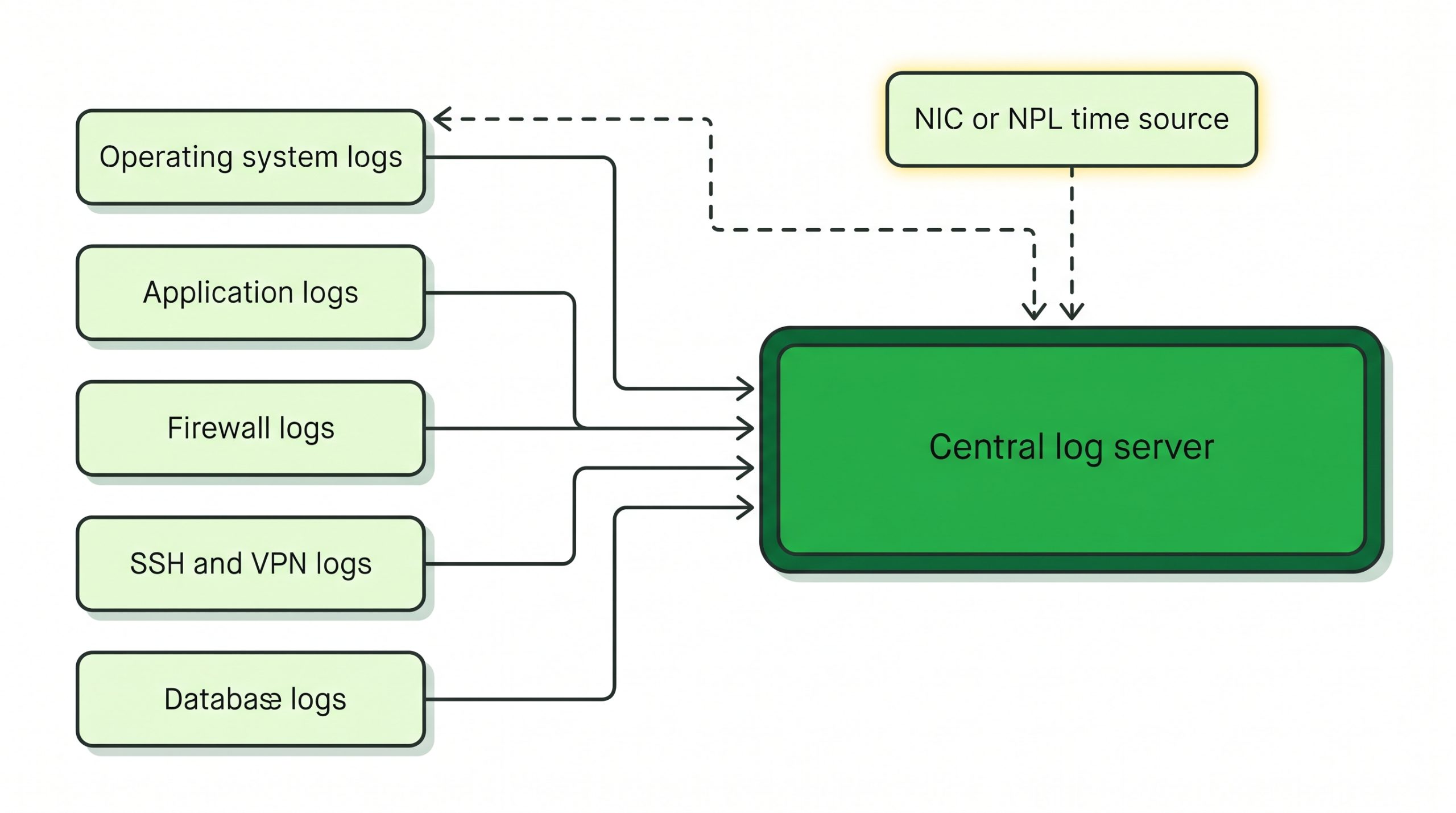
Figure 1. Five log groups feed one central log server, and every clock follows a NIC or NPL time source, so entries from different machines line up in one timeline.
Once the sources are clear, the next question is where those logs live for 180 days.
A central log server that keeps 180 days
NIST’s Guide to Computer Security Log Management (SP 800-92) describes three tiers: log generation, log analysis and storage, and log monitoring. It calls a single log server that handles all analysis and storage the simplest arrangement of the middle tier. NIST also describes arrangements with several log servers, for example one for collection, analysis and short-term storage and another for long-term storage.
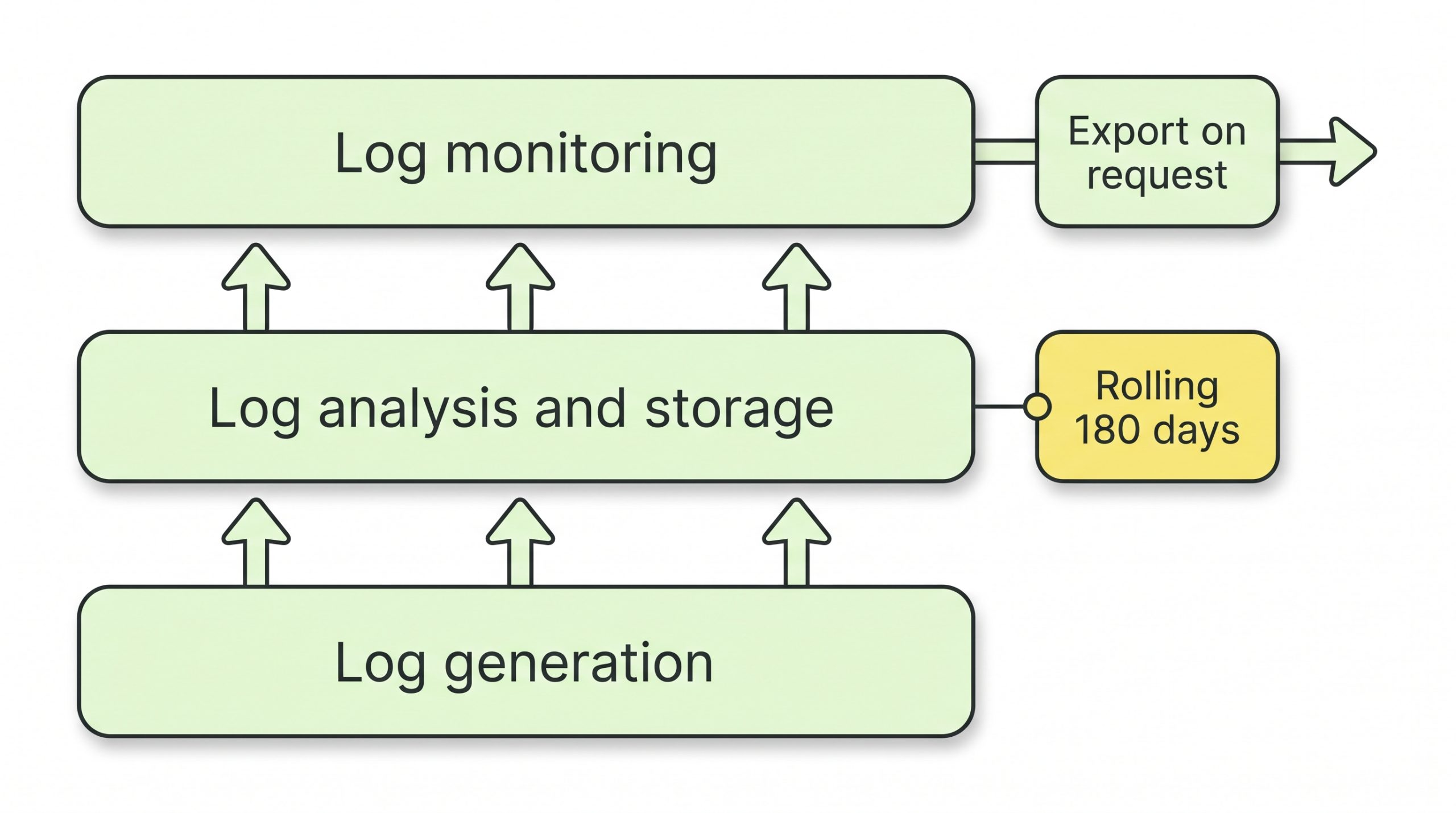
Figure 2. The three NIST tiers applied to CERT-In: retention of a rolling 180 days sits in log analysis and storage, and export on request sits in log monitoring.
Sync every clock first
The CERT-In FAQ lists the current NTP servers. NIC runs samay1.nic.in and samay2.nic.in, and NPL runs time.nplindia.org. The FAQ suggests configuring them as the time source of your enterprise NTP server, which your other servers then follow.
On Linux servers that use chrony, a line such as server samay1.nic.in iburst adds the NIC source. The chrony.conf documentation explains that iburst sends a short burst of requests so the first clock update comes sooner. Clocks do not have to run in Indian Standard Time (IST). However, the FAQ asks for the time zone to be recorded with the time.
Ship logs off each server
NIST notes that the integrity of logs can be breached inadvertently or intentionally. So the central log server receives copies, in real time or in scheduled batches, as the NIST guide describes.
On Windows Server, Windows Event Forwarding sends the events you choose to a Windows Event Collector server. Microsoft adds that forwarding clients reconnect and send their backlog after a broken link comes back. On Linux, the systemd journal can forward messages to a traditional syslog daemon, as the journald.conf manual describes.
Set retention on the store and check the source
Retention has to hold on the central log server, because local logs rotate. The journald.conf manual shows why. By default, the persistent journal may use 10 percent of its file system, capped at 4G, and size-based deletion removes old files. The time-based setting, MaxRetentionSec, is off by default.
Does the local journal cap on each busy server hold 180 days of entries? Is there an alert for the day forwarding silently stops?
Integrity is the next setting to configure. NIST describes calculating a message digest for each archived log file and storing it securely, so any later change is detected.
| WHAT TO VERIFY Does every server report the same time as the NTP source, and does each log line carry a time zone? Does a search on the central log server today return entries from 180 days ago? Which alert fires when a server stops forwarding logs? Who can delete logs on the central log server, and is that account separate from the server admin accounts? Are message digests of archived log files stored where server admins cannot change them? |
With logs collected and kept, the remaining work is proving it on demand.
The evidence pack for an auditor or CERT-In
An evidence pack is a short folder of records, prepared before anyone asks. Each item maps to one direction, so a reviewer can tick it off.
| Evidence item | What it shows | Direction it supports |
|---|---|---|
| Log source inventory: every server, firewall and application, with what each one logs | Logs of all ICT systems are enabled | (iv) |
| Retention settings exported from the central log server | A rolling 180 days is configured | (iv) |
| Dated search result showing the oldest entry held | The 180 days actually exist on disk | (iv) |
| NTP configuration and a dated offset check from each server | Clocks follow NIC or NPL | (i) |
| Copy of the Point of Contact details sent to CERT-In | Requests reach a named person | (iii), Annexure II |
| Sample export of one day of logs in a readable format | Logs can be provided when ordered | (iii), (iv) |
| Incident runbook with CERT-In’s email and phone for reporting | The 6-hour report has an owner and a route | (ii) |
| Message digests of archived log files | Archived logs have not changed | (iv), kept securely |
Sources: CERT-In Directions of 28 April 2022; NIST SP 800-92.
The pack pairs a configuration export with a dated search result. Each one carries the date it was taken.
Reporting routes and who owns them
The directions list the reporting routes. Incidents go to [email protected] or the phone line 1800-11-4949, and Point of Contact details go to [email protected]. The CERT-In FAQ adds that a first report may carry the information available at the time, with the rest sent later.
The same FAQ says the reporting duty cannot be transferred or contracted away. Who patches the flaw behind an incident is a separate question, covered in our guide to the emergency patching SLA for managed servers.
Does the backup plan cover the log store as well as production data? Our immutable backup and ransomware restore drill guide shows how to keep one copy that stolen admin passwords cannot delete.
Where this set-up stops
A single log server is also a single point of failure. NIST describes multiple log servers as one way to add redundancy. Who decides whether a logged event is reportable under Annexure I?
For personal data under the Digital Personal Data Protection (DPDP) Rules, our DPDP Rules backup and breach response checklist covers what to ask a hosting provider. Do any sector regulators that cover your business set their own logging periods?
CERT-In log retention on your own servers
| Criterion | Why it matters | What to verify |
|---|---|---|
| Log coverage | Direction (iv) covers all ICT systems | Inventory lists every server, firewall and application |
| Failed events | The CERT-In FAQ asks for successful and unsuccessful events | Logon failures and blocked connections appear in the logs |
| Retention | Rolling 180 days within Indian jurisdiction | Oldest entry on the central log server is at least 180 days old |
| Time | Direction (i) names NIC and NPL time | Each server follows NIC or NPL and logs its time zone |
| Integrity | Logs are to be kept securely | Message digests stored apart from server admin access |
| Production on demand | Direction (iii) allows CERT-In to set format and timeframe | A sample export exists and the Point of Contact is current |
FAQs
Does CERT-In log retention apply to a small company with one server?
The section 43A definition of body corporate that the CERT-In FAQ quotes sets no size threshold. The same FAQ says individual citizens are not covered by the directions.
Can CERT-In logs be stored on a cloud region outside India?
The direction says logs are maintained within Indian jurisdiction. In Q35, the CERT-In FAQ asks whether a copy of logs must be stored in India only. Its answer is that logs may be stored outside India also, as long as entities produce them to CERT-In in a reasonable time. Q36 adds that a service provider offering services to users in India needs to enable and maintain logs and records of financial transactions in Indian jurisdiction.
Who at CERT-In can ask for our server logs?
The CERT-In FAQ says a request for logs comes from a CERT-In officer not below the rank of Deputy Secretary to the Government of India. The directions send all such communications to your designated Point of Contact. Is that person’s record with CERT-In current?
Is a self-run log store the right fit?
CERT-In’s ask is short: log every ICT system, keep the logs for a rolling 180 days, keep clocks on national time, and produce the logs on demand. For a team with a few servers, one central log server, NIC or NPL time and a dated evidence pack map to each part of that ask. Has someone been named to check forwarding, retention and digests on a fixed schedule?
Does the estate span many sites? Does a provider’s managed scope include log collection, retention checks and evidence reports?
| NEXT STEP A scoping call for RackBank’s managed services with security and compliance management can begin with a review of the log source inventory and the WHAT TO VERIFY checklist. This helps define which security checks remain the team’s responsibility and which can be handled by the service provider. |
