

| TL;DR: Most ERP go-live failures trace back to infrastructure sized from a vendor datasheet instead of from measured transaction load. Six areas need evidence before cutover: compute and storage, performance under peak concurrency, integration and migration integrity, security controls, recovery, and monitoring. A control you cannot evidence has not been implemented. Screenshots, exports and timed test results are the deliverable, not a status column in the project plan. Recovery objectives are the item teams declare rather than measure. Run a timed restore to a clean host before |
ERP infrastructure requirements are the part of a deployment that gets approved fastest and tested least. The application is configured, the users are trained, data is migrated, and the system still degrades in week one because the environment underneath it was sized from a minimum specification rather than from the transaction volume the business actually runs. The failure shows up as slow month-end postings, batch jobs that overrun their window, and integration timeouts that nobody owns.
This checklist is for the IT team running the final verification before a production go-live or a migration cutover. It covers what to measure, what to test, and what evidence to collect at each gate.
What a readiness check actually tests
A readiness check is not a second round of user acceptance testing. UAT proves the application behaves correctly. Verifying ERP infrastructure requirements proves something narrower and harder. A readiness check proves the infrastructure behaves correctly when the application is under production load, when an integration fails, when a disk fills, and when someone has to restore last night’s database at 2 am.
The difference between the two is evidence. Every item below produces an artifact: a benchmark output, a log extract, a signed role matrix, a timed restore. Items that cannot produce one are open risks carried into go-live, and they should be named as such on the go or no-go call rather than marked complete.
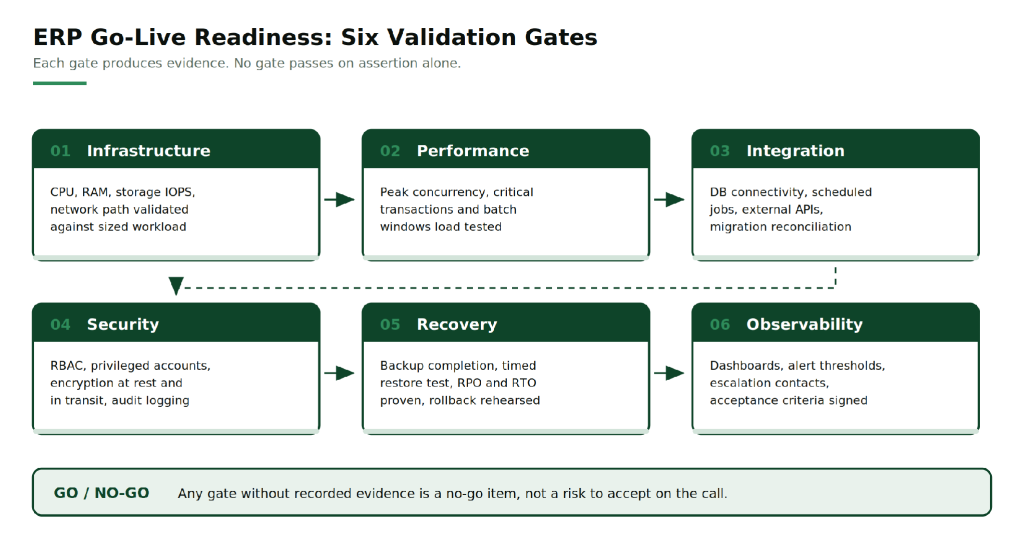
Figure 1: The six validation gates. Each gate produces evidence, and no gate passes on assertion alone.
Step 1: Validate ERP infrastructure requirements for compute, memory, storage and network
Size the environment from measured load, then verify the build matches the sizing. The inputs that matter are peak transactions per hour, concurrent sessions rather than named users, the row count of the largest transactional tables, the annual data growth rate, and the duration of the longest batch job.
Memory. ERP application servers and the database compete for the same resource, which is why they are usually separated. Size the database buffer pool to hold the working set, not the whole database. In-memory platforms are different again: SAP HANA and similar engines need RAM covering the compressed data footprint plus working space for queries and delta merges. RackBank’s dedicated ERP and CRM servers are configured from 32 GB up to 2 TB of DDR4 or DDR5 ECC memory, which covers the range from a mid-size Odoo or ERPNext deployment to a high-memory S/4HANA node.
CPU. Two different properties matter for two different workloads. Batch posting and single-threaded report generation depend on clock speed. Concurrent user sessions depend on core count. Check the licence model before adding cores, because Oracle Database and Microsoft SQL Server bill per core and an oversized host can cost more in licensing than in hardware.
Storage. Capacity is the easy part. The number to verify is sustained IOPS at the write latency your database tolerates, measured with a tool such as fio against the actual volume layout. Put data files, transaction logs and temp space on separate devices so a log flush does not contend with a table scan. NVMe on RAID 10 is the usual configuration for transactional ERP because it keeps write latency low while surviving a drive loss.
Network. Measure latency on the application to database hop, because every query pays it. Then measure it from the branch offices and plants that will use the system, not from the data centre. A 40 ms round trip that nobody noticed in testing becomes visible when a sales order screen makes thirty calls to render.
Record the result of each measurement against the sizing assumption, so the ERP infrastructure requirements on paper and the environment as built can be compared line by line. Where the build is below the assumption, that is a finding, not a rounding difference.
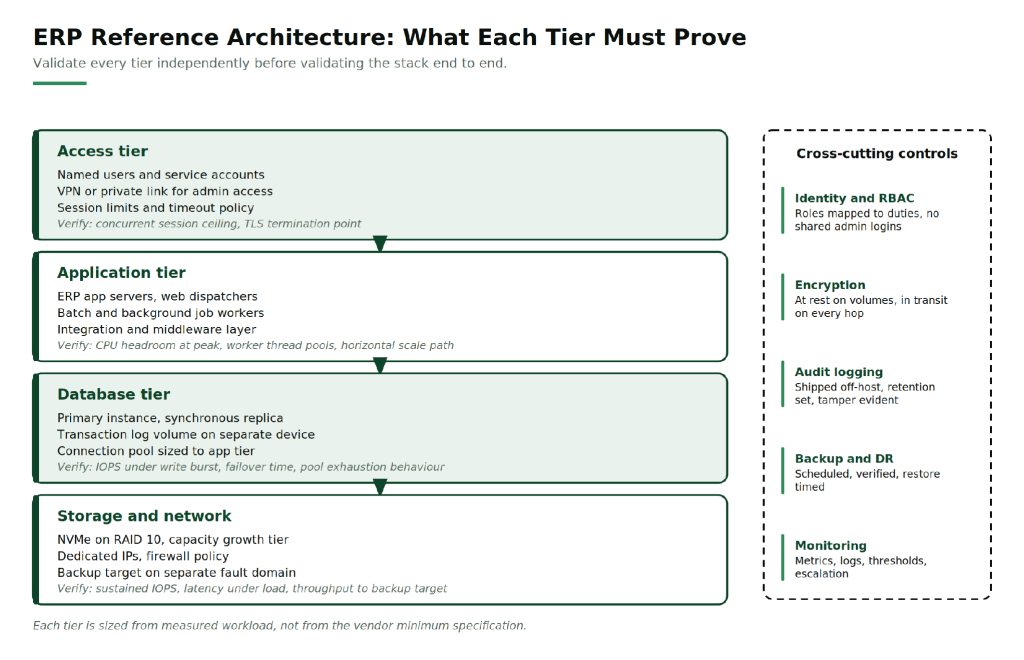
Figure 2: Validate every tier independently before validating the stack end to end.
Step 2: Test peak concurrent users, critical transactions and integration workflows
ERP performance testing fails most often because the test is not shaped like the business. A script that loops one transaction a thousand times will pass while the real mix of order entry, goods receipt, invoice posting and report generation will not.
Build the test from the transaction mix at peak, which for most organisations is the month-end close rather than a normal Tuesday. Include the heaviest reports, the payroll run, and any year-end process that will land inside the first quarter of production use.
Four things to verify:
- Concurrency ceiling. Ramp user count until response time crosses the threshold the business has agreed. The expected peak must sit to the left of that point with headroom for growth.
- Batch windows. Run the longest job against production-volume data, not a sample extract. A job that completes in four minutes on 10,000 rows may not complete at all on 10 million.
- Soak behaviour. Hold load for several hours. Connection pool exhaustion, memory leaks and log volume filling a disk only appear over time.
- Percentiles, not averages. Record p95 and p99 response times. An average hides the tail that users complain about.
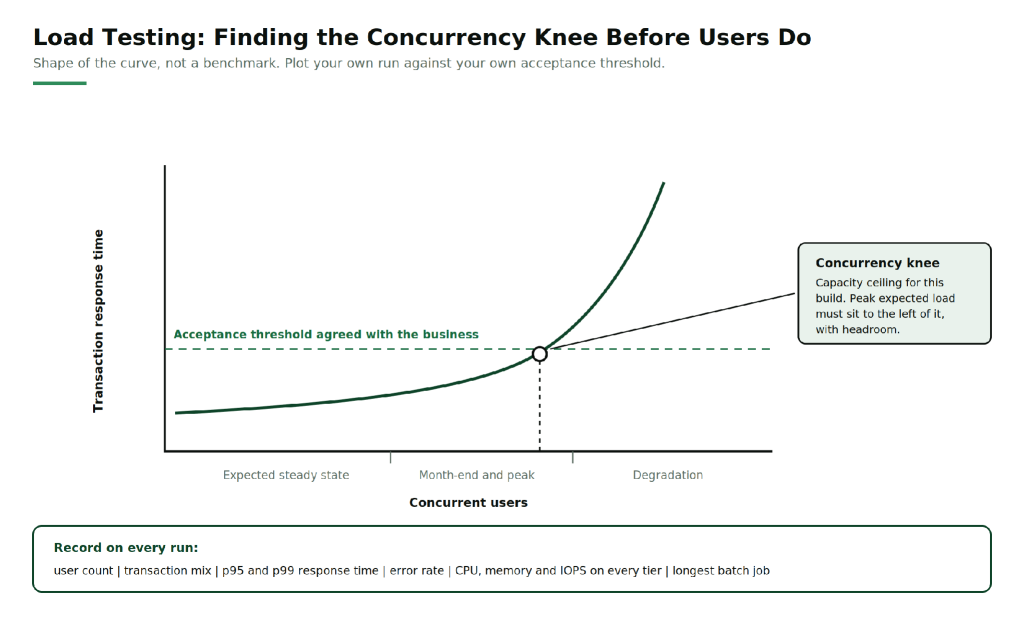
Figure 3: The shape to look for, not a benchmark. Plot your own run against your own acceptance threshold.
Step 3: Verify database connectivity, scheduled jobs, external APIs and data migration integrity
This is where most cutover weekends lose time, because each item is owned by a different team and tested in isolation.
Database connectivity. Confirm connection strings point at production, that the pool is sized to the application tier’s worker count, and that you know what the application does when the pool is exhausted. Test the failover path by failing the primary over deliberately and timing the recovery. A dedicated database server with a configured replica is only useful if someone has watched the failover complete.
Scheduled jobs. List every job, its window, its dependencies and its owner. Check for chains that overlap, jobs that take locks another job needs, and anything scheduled in a time zone that differs from the server’s. Confirm each job’s failure behaviour: alert, retry, or fail silently.
External APIs. Payment gateways, logistics providers, GST filing, banking interfaces and CRM sync all need production credentials, not the sandbox keys that have been in the config since UAT. Test timeout handling, retry logic, and whether a retried request creates a duplicate transaction.
Migration integrity. Reconcile three things rather than one: record counts by object, control totals such as the sum of open receivables and payables, and a sampled set of open transactions traced line by line against the legacy system. Finance signs this off, not IT.
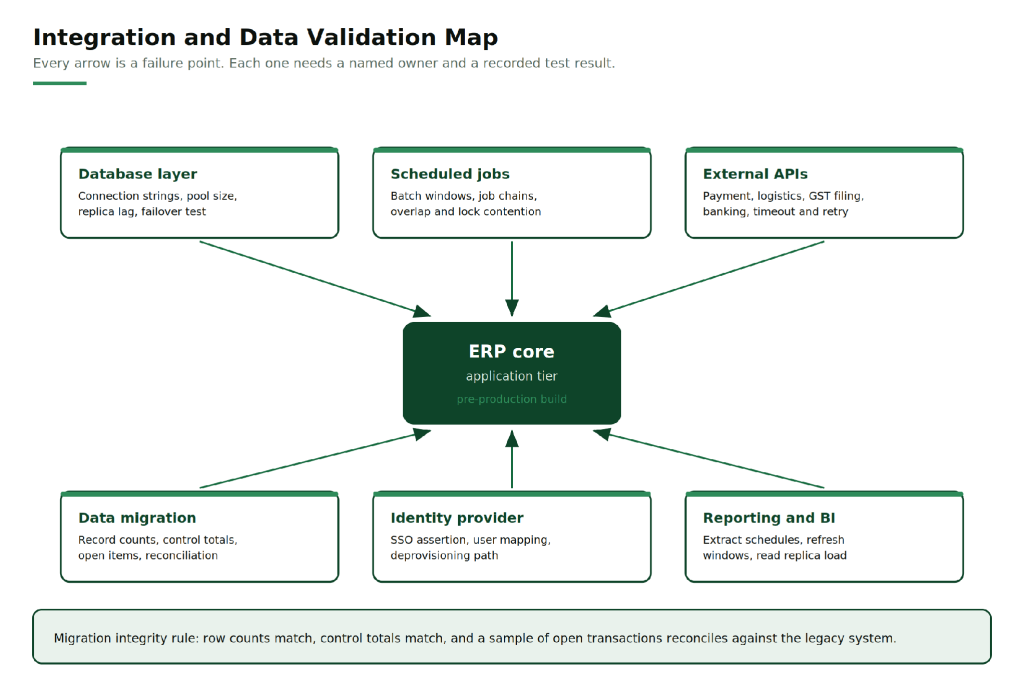
Figure 4: Every arrow is a failure point. Each one needs a named owner and a recorded test result.
Step 4: Check role-based access, privileged accounts, encryption and audit logging
ERP systems hold payroll, customer records, vendor contracts and financial data, which places them inside the scope of DPDP obligations for Indian organisations and inside the scope of statutory audit for everyone.
Verify five layers:
- Role-based access. Roles map to job duties, and segregation of duties is enforced where it matters: the person who creates a vendor cannot also approve payment to it.
- Privileged accounts. Default and vendor accounts are disabled, administrators use named accounts, and the break-glass account is sealed with its use alerted on.
- Network boundary. Administrative interfaces are reachable only over VPN or a private link, never from the public internet.
- Encryption. Volumes and backups are encrypted at rest, and TLS covers every hop including application to database, which is the one people forget.
- Audit logging. Logins, privilege changes, master data changes and failed access attempts are logged, shipped off the host so a compromised server cannot erase its own trail, and retained for the period your auditor expects.
Hosting location belongs in this section too. RackBank operates ISO 27001 and ISO 9001:2015 certified facilities to TIA-942 Rated 3 design with DPDP-aligned handling of Indian customer data, so residency is a configuration decision rather than a contractual negotiation.
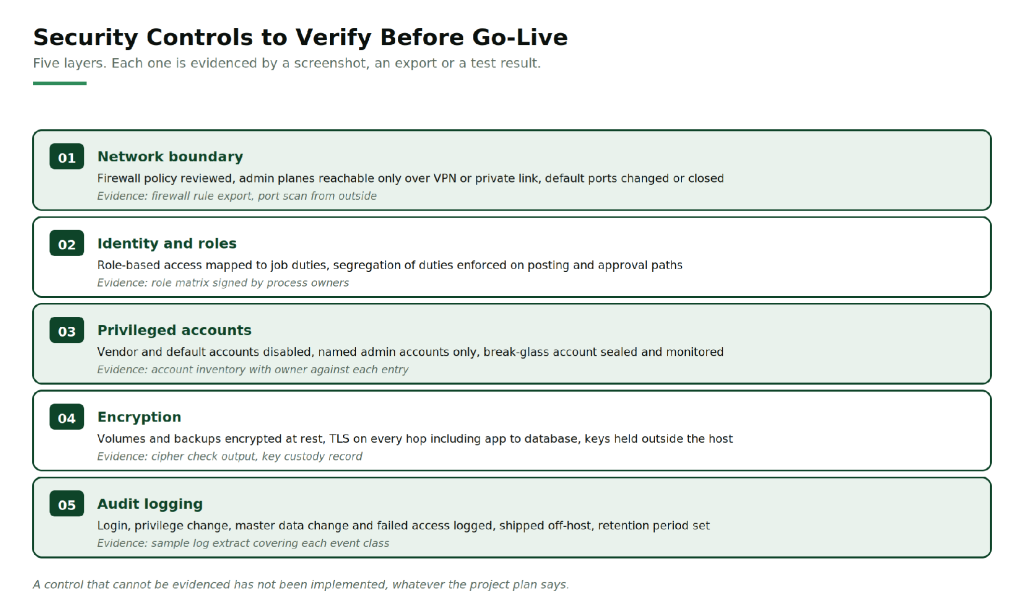
Figure 5: Five layers, each evidenced by a screenshot, an export or a test result.
Step 5: Validate backup completion, restore, recovery objectives and rollback
A backup job that reports success has proved that it ran. It has not proved that the data inside it can be restored into a working ERP system, which is a different claim and the only one that matters.
Before go-live, restore a full database backup to a clean host, start the application against it, and time the whole sequence. That number is your real recovery time, and it is usually longer than the one in the DR document.
Then separate the two objectives, because teams routinely conflate them:
- RPO is the data you accept losing, measured from the last recoverable point to the incident. If backups run nightly and replication is asynchronous with lag, your RPO is the lag, not the schedule.
- RTO is the time to restore service, measured from the incident rather than from the restore command. Detection time, the decision to roll back, and post-restore validation all sit inside it.
The rollback plan needs three things written down before cutover: the decision deadline, the named person who makes the call, and the state the legacy system must be held in until rollback is no longer possible. Keeping the old system readable but frozen is the usual answer.
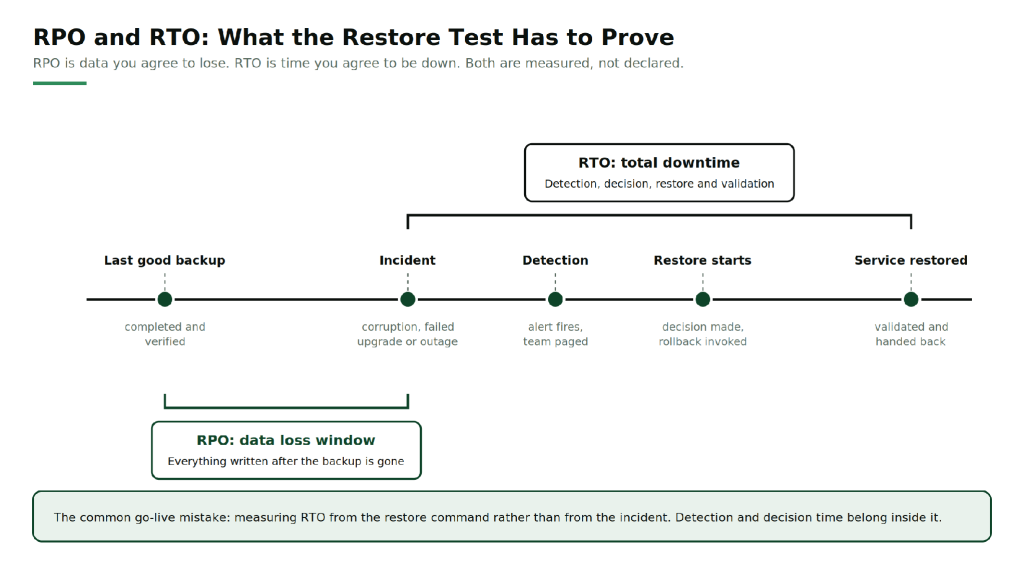
Figure 6: RPO is data you agree to lose. RTO is time you agree to be down. Both are measured, not declared.
Step 6: Establish monitoring dashboards, alert thresholds, escalation contacts and acceptance criteria
Monitoring has to be live before go-live week, not configured during it. The first production incident is a poor time to discover that nobody is receiving the alerts.
Build it in three parts. Dashboards cover each tier: host CPU and memory, storage IOPS and queue depth, database locks and replica lag, job queue depth and batch duration, integration error counts, and session counts. Thresholds turn those metrics into pages, which means they need numbers agreed in advance rather than a vague sense of what looks wrong. Escalation turns a page into a response, which means names, phone numbers, shift coverage and the vendor support contract number.
Go-live acceptance criteria belong in the same document and should be numeric: response time at peak load, batch completion by a stated clock time, zero unresolved critical alerts across a defined hypercare period, and a rollback decision deadline with an owner against it.
Teams without 24×7 platform coverage of their own usually place this layer with their infrastructure provider. RackBank’s managed services cover monitoring and incident response, database and ERP administration, and compliance documentation, which is the practical route for an organisation whose IT team is three people and a helpdesk.
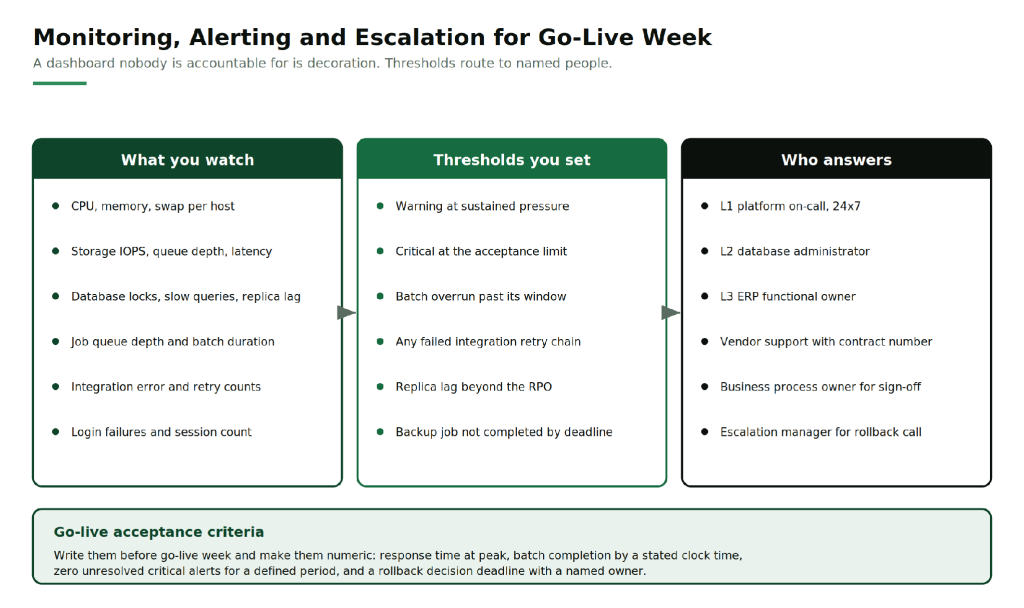
Figure 7: A dashboard nobody is accountable for is decoration. Thresholds route to named people.
The ERP go-live checklist in one table
| Area | Why it matters | Evidence to produce before sign-off |
|---|---|---|
| Compute and memory | Undersized hosts degrade first at month-end, when visibility is highest | Sizing document, build specification, CPU and memory headroom at peak load |
| Storage | Write latency under load determines transaction throughput | IOPS and latency benchmark against the production volume layout |
| Network | Every query pays the application to database round trip | Latency measured from the data centre and from each user site |
| Performance | Average response time hides the tail users complain about | Load test report with transaction mix, p95 and p99, and the concurrency ceiling |
| Batch | Jobs validated on sample data fail on production volume | Longest job timed on full data, inside its window |
| Integrations | Sandbox credentials and untested retries survive into production | Per-interface test log covering success, timeout and retry |
| Migration | Row counts can match while balances do not | Count, control total and open-item reconciliation signed by finance |
| Access control | Audit scope covers who could act, not only who did | Role matrix signed by process owners, privileged account inventory |
| Encryption | The application to database hop is the common gap | Cipher verification output and key custody record |
| Audit logging | A local-only log is erasable by whoever compromised the host | Sample extract per event class from the off-host log store |
| Backup and restore | Backup success proves the job ran, not that data is recoverable | Timed restore to a clean host with the application started against it |
| Recovery objectives | RPO and RTO are usually declared, not measured | Measured figures from the restore test, signed against the agreed targets |
| Rollback | A decision made under pressure without a deadline is made too late | Rollback runbook with decision time, owner and legacy system freeze state |
| Monitoring | Alerts with no named recipient are not alerts | Dashboard screenshots, threshold list, escalation roster with contact numbers |
FAQs
What are the infrastructure requirements for an ERP system?
An ERP system needs a high-frequency multi-core CPU, ECC memory sized to the database working set, NVMe storage on RAID 10 for transactional write performance, and a low-latency network path between the application and database tiers. The exact figures come from your peak transaction volume and concurrent session count, not from the vendor minimum.
How much RAM does an ERP server need?
It depends on the engine. Disk-based databases need enough memory to hold the active working set in the buffer pool, which is often far less than total data size. In-memory platforms such as SAP HANA need RAM covering the compressed data footprint plus working space. Dedicated ERP configurations commonly range from 32 GB to 2 TB of ECC memory.
How do you test ERP performance before go-live?
Build a load test from the real transaction mix at peak, usually the month-end close. Ramp concurrency until response time crosses the agreed threshold to find the ceiling, run the longest batch job against production-volume data, and hold load for several hours to expose connection pool exhaustion and memory leaks. Record p95 and p99, not averages.
What is the difference between RPO and RTO in an ERP deployment?
RPO is how much data you accept losing, measured from the last recoverable point to the incident. RTO is how long the service can be down, measured from the incident rather than from the restore command, so detection and decision time count against it. Both should come from a timed restore test, not from a policy document.
What should be in an ERP go-live checklist?
Six areas with evidence against each: infrastructure validated against measured workload, performance tested at peak concurrency, integrations and migrated data reconciled, access control and encryption verified, a timed restore and rollback plan proven, and monitoring with thresholds and escalation contacts live before cutover.
Before the go or no-go call
Nothing in this list is difficult on its own. The readiness items that get skipped are the ones that need a window: the timed restore, the full-volume batch run, the soak test. They are also the ones that determine whether the first month in production is quiet. Booking those windows early is the single change that moves a go-live from hopeful to verified.
If you are sizing or validating ERP infrastructure requirements for a deployment or a migration, RackBank’s engineering team reviews configurations against workload before anything is provisioned. Start with the ERP and CRM server configurations and ask for a sizing review against your own transaction volumes.