

TL;DR
▪ Database server capacity planning starts with measuring the workload you already run, not with reading a hardware catalogue. Queries per second, average CPU time per query, working-set size and write volume decide the configuration.
▪ Size CPU from concurrent active queries, not from total connections. Hold peak utilisation near 60 to 70 percent so there is room when a query plan changes.
▪ RAM is sized around the working set: the hot tables, their indexes, and the per-connection memory used for sorts and joins. Rising temporary file writes and a falling cache hit ratio mean you are short.
▪ Storage needs four numbers, not one. Usable capacity, sustained IOPS, throughput and tail latency fail independently of each other.
▪ Provisioned storage is a multiple of raw table data once indexes, write-ahead logs, bloat, backups and replicas are counted.
▪ A load test at projected peak finds the point where response time turns upward. A spreadsheet never will.
Database server capacity planning goes wrong in two directions, and both are expensive. Teams either buy for a peak they will not see for three years, or they size for last year’s traffic and spend the next twelve months firefighting slow queries. The method below avoids both by deriving each resource from a measured workload characteristic rather than from a vendor tier.
This is a planning guide for workloads you already run or can estimate from an application design. It covers CPU, memory, storage and growth as a connected system, because changing one of them moves the others.
Start with workload characteristics, not hardware
Every number later in this process comes from five inputs. Collect them before you look at a single server configuration.
Query mix. The ratio of reads to writes, and inside reads, the split between point lookups served from an index and analytical scans that touch millions of rows. A point lookup costs microseconds of CPU. An unindexed aggregate on a 200 GB table costs seconds and evicts cache on its way through.
Concurrency. Not how many connections the application pool opens, but how many queries are actually executing at the same instant. These numbers differ by an order of magnitude in most deployments.
Data volume and shape. Total size on disk, the size of the subset queried daily, row width, and index count per table.
Write volume. Transactions per second, average rows modified per transaction, and whether writes arrive evenly or in batch windows.
Growth rate. Measured from the last six to twelve months of actual storage consumption, not from a sales forecast.
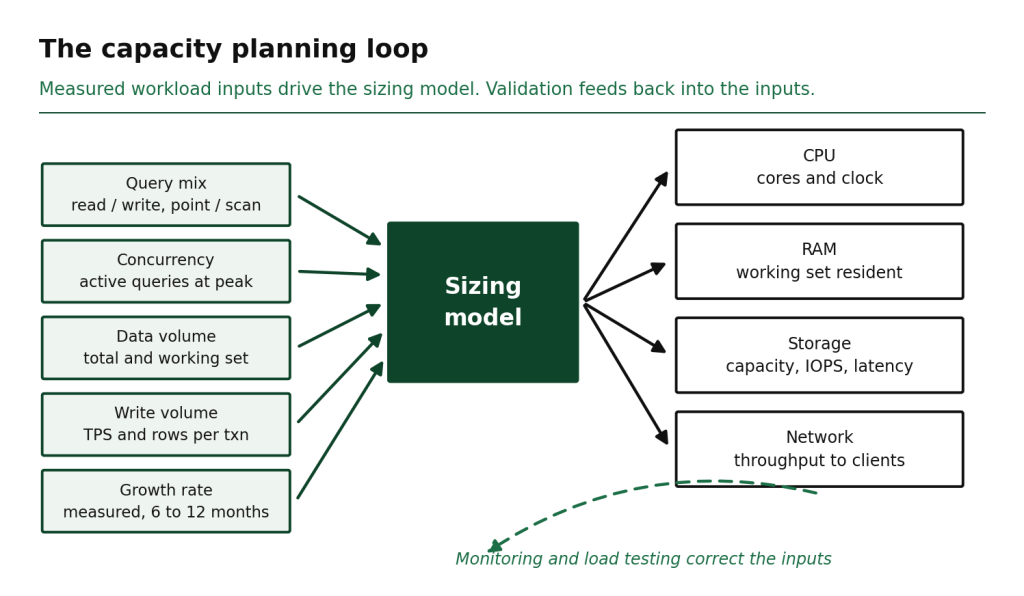
Figure 1. Workload inputs feed the sizing model, and validation feeds back into the inputs.
Estimating CPU capacity for database workloads
CPU requirements for a database server follow from concurrency and query cost, and the arithmetic is simple enough to do on paper.
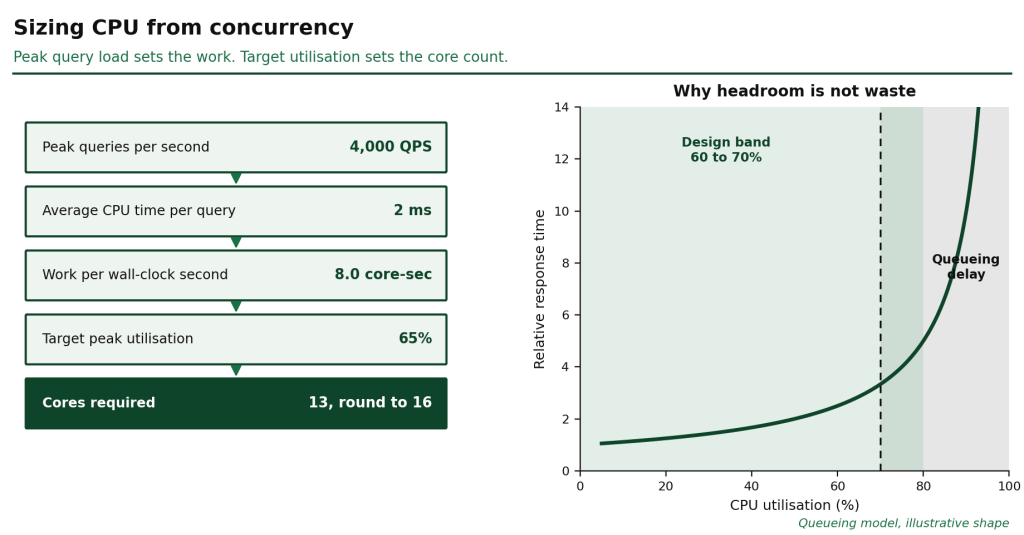
Take the average CPU time a query consumes and multiply it by the queries per second you expect at peak. A workload running 4,000 queries per second at 2 milliseconds of CPU time each needs 8 CPU-seconds of work per second of wall clock, which is 8 fully saturated cores. You do not buy 8 cores. You buy enough that those 8 cores of work sit at your target utilisation.
Target 60 to 70 percent peak utilisation on a transactional database. The headroom is not waste. It absorbs the vacuum or purge job, the checkpoint flush, the analytics query someone runs at month end, and the plan regression that turns an index scan into a sequential scan overnight. Above roughly 80 percent, queueing delay rises faster than throughput does, and response times degrade long before the CPU graph looks alarming.
Three adjustments matter:
▪ Clock speed beats core count for single-threaded work. Most transactional queries execute on one core. A 24-core part at a lower base frequency can be slower per query than a 12-core part at a higher one, even though the spec sheet looks better.
▪ Parallel query changes the arithmetic. PostgreSQL parallel workers, MySQL parallel index reads and columnar engines like ClickHouse will use every core you give them for a single analytical statement. Analytical nodes size by core count, transactional nodes size by frequency.
▪ Connection overhead is real. Each connection carries process or thread cost even when idle. Connection pooling in front of the database usually returns more performance than an extra CPU socket does.
Sizing RAM around the working set
RAM requirements for a database are set by the working set, meaning the portion of data touched regularly, plus the indexes that serve those queries, plus the memory each connection claims while it runs.
The working set is almost never the whole database. A 4 TB order history where applications read the last 90 days has a working set closer to 300 GB. Size memory so that working set and its indexes stay resident, and disk reads become the exception rather than the normal path.
Budget memory in four parts:
1. Shared cache. The buffer pool in MySQL InnoDB, shared_buffers plus operating system page cache in PostgreSQL, the WiredTiger cache in MongoDB. This is the largest allocation and the one that decides whether queries touch disk.
2. Per-connection memory. Sort buffers, join buffers, hash tables. PostgreSQL work_mem is allocated per sort node, so a single complex query can claim several multiples of it, and 300 concurrent connections multiply the risk.
3. Maintenance memory. Vacuum, index builds and bulk loads need their own allocation, and starving them pushes maintenance into the next business day.
4. Operating system headroom. Leave real margin. A database host that reaches swap has already lost more performance than any configuration change will return.
Four signals say you are under-provisioned on memory, and all are visible in standard monitoring: buffer cache hit ratio drifting down, temporary files being written during sorts, page evictions rising while query patterns stay constant, and read IOPS climbing without a matching rise in query volume. That last one is the clearest tell. Memory pressure shows up as a storage problem first.
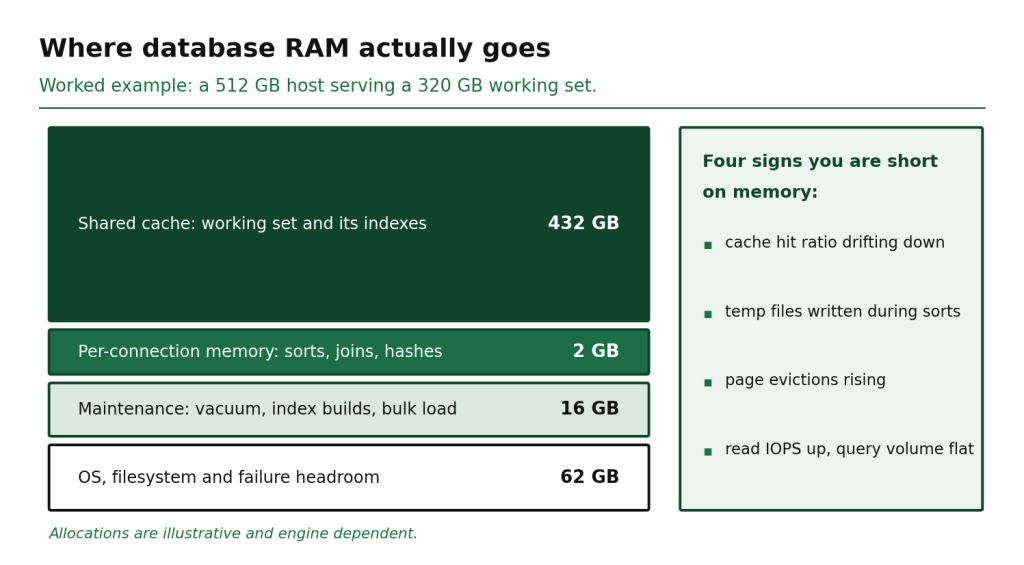
Figure 3. Memory allocation on a 512 GB host, and the four signals of memory pressure.
Storage: capacity, IOPS, throughput and latency are four numbers
Teams specify storage with one number and get surprised by three others. These fail independently, and a disk that satisfies capacity can miss the latency budget by a wide margin.
| Metric | What it measures | How to measure it | What it breaks when short |
|---|---|---|---|
| Usable capacity | Space after RAID and filesystem overhead | Current size plus projected growth | Writes stop, and recovery is urgent |
| IOPS | Small random operations per second | Peak read and write IOPS from the OS, not the daily average | Queries queue behind the device |
| Throughput | Sequential MB per second | Backup windows, bulk loads, table scans | Backups overrun their window |
| Latency | Time to complete one operation, measured at p99 | Device service time during peak hour | Commit latency rises and the application feels slow |
Transactional databases are dominated by small random reads and writes, which makes IOPS and tail latency the deciding metrics. Analytical databases are dominated by large sequential scans, which makes throughput the deciding metric. Mixing both profiles on one volume means the scan-heavy workload fills the queue and the transactional workload pays for it in latency.
Write-ahead logging adds a requirement that capacity planning often misses. Every commit has to be durably written before it is acknowledged, so commit latency is bounded by the latency of the device holding the log. This is why NVMe matters more for write-heavy databases than raw capacity does, and why RackBank runs dedicated database servers on NVMe SSD in RAID 10 rather than on shared network storage.
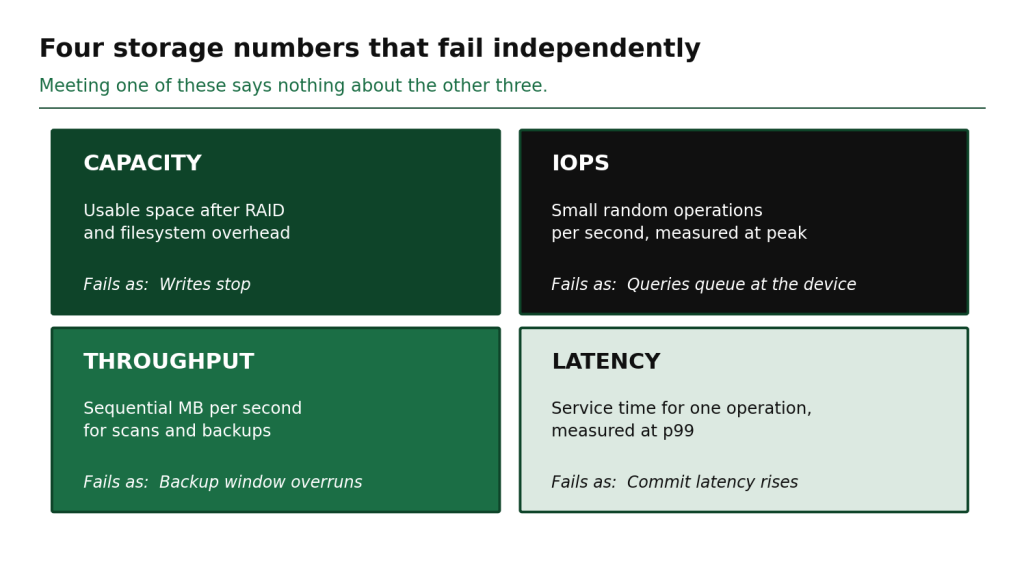
Figure 4. Capacity, IOPS, throughput and latency fail independently of each other.
Account for growth: indexes, logs, backups and replicas
Raw table data is a fraction of what you provision. Count every multiplier before you commit to a disk size.
▪ Indexes. Commonly 20 to 50 percent of table size on transactional schemas, and higher where a table carries many secondary indexes. Verify yours rather than assuming.
▪ Write-ahead logs. PostgreSQL WAL, MySQL binlogs and MongoDB oplog are sized by write rate and retention, not by database size. A busy write path can hold hundreds of gigabytes of log.
▪ Bloat and free space. Update-heavy tables accumulate dead tuples between vacuum runs. Filesystems also degrade near capacity, so plan to operate below 75 percent utilisation.
▪ Temporary space. Sorts, index builds and large joins spill to disk and need room to do it.
▪ Backups. Retention multiplies everything. Daily fulls with 14-day retention stored locally is 14 copies, and that is before compression or an incremental scheme.
▪ Replicas. Every replica is a full copy of the data and its indexes, on its own storage.
Apply growth to the whole stack, not just to the table data. If data grows 8 percent monthly, indexes, logs and backups grow with it. Project in months rather than years, and set a trigger threshold at the point where expansion needs to be ordered rather than at the point where the disk fills.
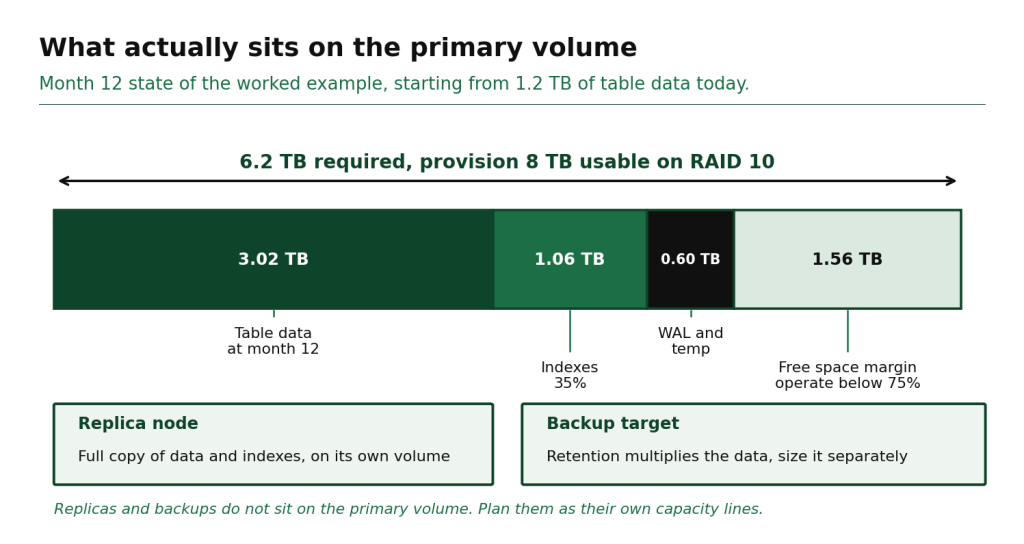
Figure 5. The primary volume, with replica and backup storage planned separately.
Validate estimates with monitoring and load testing
An estimate is a hypothesis. Two things test it.
Baseline monitoring on the current system gives the inputs that make the estimate credible. Collect at one-minute granularity for at least two full business cycles: CPU utilisation and run queue depth, cache hit ratio, active sessions, read and write IOPS with latency percentiles, WAL or binlog generation rate, and daily storage consumption. Database workload monitoring at daily averages will hide the peak that actually sizes the machine.
Load testing proves the configuration before it carries production traffic. Use pgbench for PostgreSQL, sysbench for MySQL, or HammerDB where a TPC-style profile fits, and shape the test to your real read and write ratio rather than the default. Run three tests:
1. A steady-state test at projected peak, held for several hours, to confirm latency stays inside budget.
2. A step test that raises concurrency until p99 latency turns sharply upward. That knee is your real ceiling, and it is usually well below 100 percent CPU.
3. A failure test: pull a replica, trigger a checkpoint storm, or run a backup during peak, and check what the application experiences.
Record the results next to the estimate. When the two disagree, the measurement is right.
A sample database capacity planning worksheet
The worksheet below is a worked example for a mid-sized transactional PostgreSQL workload. Every figure in the assumptions column is an input you supply from your own monitoring. The outputs follow from the formulas, so changing an assumption changes the result rather than the method.
| Input | Example assumption | Formula | Derived requirement |
|---|---|---|---|
| Peak queries per second | 4,000 | ||
| Average CPU time per query | 2 ms | QPS x CPU time | 8 core-seconds per second |
| Target peak utilisation | 65% | Core-seconds / 0.65 | 13 cores, round to 16 |
| Total data on disk | 1.2 TB | ||
| Working set (90-day hot data) | 320 GB | ||
| Index overhead | 35% of working set | 320 x 1.35 | 432 GB resident |
| Peak concurrent connections | 250 | 250 x 8 MB work_mem | 2 GB per-connection |
| OS and maintenance headroom | 20% | (432 + 2) x 1.2 | 521 GB, round to 512 GB RAM |
| Peak write IOPS | 12,000 | Plus 40% headroom | 17,000 IOPS sustained |
| Commit latency budget | 2 ms p99 | Device p99 under load | NVMe required |
| Monthly data growth | 8% | 1.2 TB over 12 months | 3.0 TB at month 12 |
| Free space margin | Operate below 75% | Footprint / 0.75 | 1.56 TB margin |
| Primary volume | Data + indexes + WAL + margin at month 12 | 6.2 TB, provision 8 TB RAID 10 | |
| Replica storage | 1 synchronous replica | Full copy of data and indexes | Separate 8 TB volume |
| Backup target | 14 days, incremental | Fulls plus increments | Separate storage, sized on retention |
Two notes on reading it. The 16-core and 512 GB results are specific to these assumptions, and a workload with heavier analytical queries or a larger working set lands somewhere else entirely. And the primary volume comes out at more than six times the 1.2 TB of table data in place today, before the replica and the backup target are counted at all. Making that visible before purchase rather than after is the whole point of the exercise.
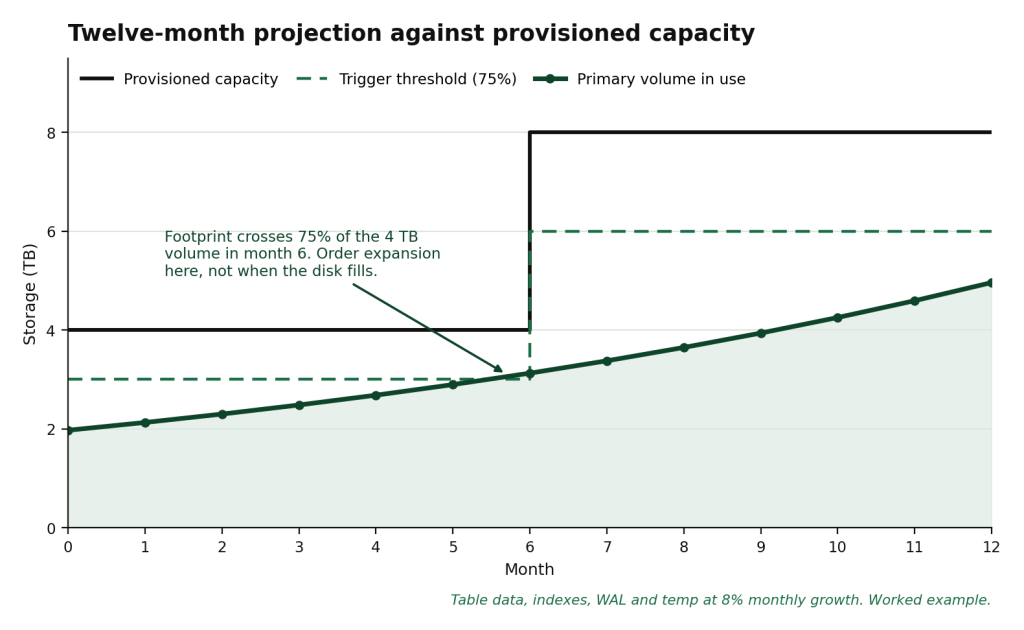
Figure 6. Growth projection with a trigger threshold set before the volume fills.
Matching the estimate to real hardware
Once the worksheet produces numbers, the configuration question becomes concrete. RackBank’s high-performance dedicated servers run on single-tenant bare metal, which matters for database workloads because capacity planning assumes the resources you sized are the resources you get. On shared hypervisors, a neighbouring workload can consume IOPS you planned for, and the estimate stops holding.
Database configurations span 32 GB to 2 TB of DDR4 and DDR5 ECC memory with NVMe storage in RAID 10, which covers everything from a single-node PostgreSQL instance to a high-memory SAP HANA or Redis cluster node. Where capacity planning becomes a continuing task rather than a one-time exercise, the RackBank managed services team handles monitoring, capacity planning and database tuning as part of infrastructure management.
Re-run the worksheet quarterly. Workloads change shape faster than hardware refresh cycles, and a schema change or a new reporting feature can move the working set more than a year of organic growth does.
FAQs
How much RAM does a database server need?
Enough to hold the working set and its indexes in memory, plus per-connection sort memory and operating system headroom. For a 1 TB database where 300 GB is queried daily, that usually lands between 256 GB and 512 GB. Watch cache hit ratio and temporary file writes to confirm, rather than sizing from total data volume.
How do I calculate CPU requirements for a database server?
Multiply peak queries per second by the average CPU time each query consumes to get core-seconds of work per second, then divide by your target utilisation of 60 to 70 percent. Add headroom for maintenance jobs and plan regressions. Favour clock speed for transactional workloads and core count for analytical ones.
How many IOPS does my database need?
Measure peak read and write IOPS from the operating system during your busiest hour, not the daily average, then add 30 to 50 percent headroom for growth and maintenance. Pair the IOPS figure with a p99 latency target, because a device can deliver the operation count and still miss the commit latency your application needs.
How often should database capacity planning be reviewed?
Quarterly for stable workloads, monthly where data is growing faster than 5 percent per month or the application is changing. Set a storage trigger threshold at 70 to 75 percent utilisation so expansion can be ordered and executed before capacity becomes urgent.
Should I plan capacity for a dedicated server or a cloud instance?
The method is identical, but the outcome differs. Dedicated hardware gives the full resource allocation you sized, with no hypervisor contention for IOPS, which makes capacity estimates hold. Cloud instances trade that predictability for faster resizing, which suits workloads with genuinely unpredictable peaks.
Plan the configuration before the workload forces the decision
Capacity planning is cheapest when it happens before a migration or a growth cycle, and most expensive when it happens during an incident. Run the worksheet against your current monitoring data, validate the result with a load test, and size the machine to the measurement.
RackBank engineers can review your workload profile and map it to a configuration across PostgreSQL, MySQL, MongoDB, SQL Server and vector database deployments, hosted on India-resident infrastructure across Indore, Mumbai and Raipur. Ask for a database server capacity planning review before your next hardware decision rather than after it.
| Talk to RackBank about your workload Share your peak queries per second, working-set size, and write IOPS requirements. Our engineering team will recommend a suitable configuration, identify areas that require load testing, and provide a build quotation. |