

TL;DR
|
Your firewall is on and SSH accepts keys only. Now an auditor wants proof that the server meets a recognised baseline. This guide runs a CIS Benchmark Linux server hardening audit on one dedicated server: choose the level, scan, fix with a rollback, record exceptions and keep the reports.
The commands follow the AlmaLinux 9 OpenSCAP Guide, using the OpenSCAP scanner and the SCAP Security Guide content. The first-hour basics come first, and our owner’s checklist for a self-run dedicated server covers them. Still deciding who should carry this work? Start with our comparison of managed and unmanaged dedicated servers.
BEFORE YOU START
|
Step 1: Choose the CIS Level and Profile
For a production dedicated server, start with Level 1 Server. The CIS Benchmarks FAQ describes Level 1 as a base recommendation designed not to have an extensive performance impact. Level 2 is “defense in depth” for environments where security is paramount. CIS warns that Level 2 can have an adverse effect without due care.
Next, list the profiles your installed content offers:
oscap info /usr/share/xml/scap/ssg/content/ssg-almalinux9-ds.xmlIn the AlmaLinux guide, the output lists four CIS profiles. If none appears, the scap-security-guide package is missing or carries different content.
| Profile title | Profile ID | Question to check before choosing it |
|---|---|---|
| Level 1 Server | cis_server_l1 | Does the server run production services that must stay usable during the change? |
| Level 2 Server | cis | Has the auditor or a contract asked for Level 2, and is there a test server to try it on? |
| Level 1 or Level 2 Workstation | cis_workstation_l1, cis_workstation_l2 | Does this server run a graphical desktop at all? |
Sources: CIS Benchmarks FAQ; AlmaLinux 9 OpenSCAP Guide.
Whichever row fits, CIS recommends trying the profile in a test environment first.
Step 2: Run the Baseline Scan
The baseline scan changes nothing on the server. It records where the server stands today, and its report becomes your first piece of evidence. Create the ~/report folder first, because the AlmaLinux example writes there.
sudo oscap xccdf eval --profile xccdf_org.ssgproject.content_profile_cis_server_l1 --fetch-remote-resources --results ~/report/cis-before.xml --report ~/report/cis-before.html /usr/share/xml/scap/ssg/content/ssg-almalinux9-ds.xmlThe AlmaLinux guide makes –fetch-remote-resources mandatory, so the scanner can download the OVAL definitions. The terminal prints a Title, Rule and Result line for each rule. A fail result potentially requires the system to be reconfigured.
Many error results point to a privilege problem, since the OpenSCAP manual lists insufficient privileges as one cause. Why OpenSCAP and not CIS-CAT? The CIS-CAT coverage guide lists only Ubuntu Linux 20.04 LTS v3.0.0 among Linux benchmarks for CIS-CAT Lite. CIS AlmaLinux OS 9 v3.0.0 sits in the CIS-CAT Pro list instead.
The AlmaLinux guide’s sample output also tags the CIS profile titles with [DRAFT]. File the oscap info output from your own server with the reports.
Step 3: Fix One Finding at a Time, With a Rollback
Generate a fix script from the baseline results rather than running the whole profile blind. The AlmaLinux guide shows this route so that you can review and modify actions before applying them.
oscap xccdf generate fix --profile xccdf_org.ssgproject.content_profile_cis_server_l1 --fix-type bash --output ~/report/remediations.sh ~/report/cis-before.xmlAsk four questions before running any block:
- Does it change SSH, login or sudo settings? If so, has a new SSH session logged in while the old one stays open?
- Does it disable a service or remove a package the application uses?
- Does it expect partitions or mount options the server was not installed with?
- Which files does it edit, and is a copy of each one in the report folder?
Apply the blocks for one area, then recheck those rules. The OpenSCAP User Manual adds the –rule option to evaluate a single rule:
sudo oscap xccdf eval --profile xccdf_org.ssgproject.content_profile_cis_server_l1 --rule RULE_ID --results ~/report/rule-check.xml /usr/share/xml/scap/ssg/content/ssg-almalinux9-ds.xmlThe expected result is pass. A second fail means the block did not apply, or something reset the file. To undo a block, restore the copied files; if logins stop working, restore the snapshot from the console. After the last area, reboot and scan again, as the AlmaLinux guide advises.
Step 4: Record Exceptions in a Tailoring File
Some rules will not fit this server, so record each one rather than leaving a silent fail. In the OpenSCAP manual, tailoring changes the behaviour of SCAP content without modifying it. The autotailor tool in openscap-utils builds the file.
autotailor --unselect RULE_ID --output ~/report/tailoring.xml --new-profile-id cis_l1_exceptions /usr/share/xml/scap/ssg/content/ssg-almalinux9-ds.xml cis_server_l1Run oscap info on tailoring.xml to read the customised profile ID. Later scans pass –tailoring-file with that ID, and the manual warns against the original profile ID. To undo an exception, drop its –unselect and rebuild the file.
Keep a register beside the file, one row per rule:
| Rule ID | Why it is not applied | Compensating control | Approved by | Review date |
|---|---|---|---|---|
| From the report | The service or setting it would break | What reduces the same risk instead | Name and role | Next scan date |
Source: OpenSCAP User Manual, section 6 (tailoring).
Step 5: Keep the Evidence for a CIS Benchmark Linux Server Hardening Audit
Evidence is the set of files that lets someone else repeat your result. Run the final scan with the tailoring file and save it as cis-after. Then copy these items into one evidence folder off the server:
- The baseline scan, cis-before, in HTML and XML
- remediations.sh as reviewed, with the blocks you ran marked
- The final rescan, cis-after, in HTML and XML
- tailoring.xml and the exception register
- The output of oscap -V and oscap info, showing scanner and content versions
- The date, the hostname and the person who ran each scan
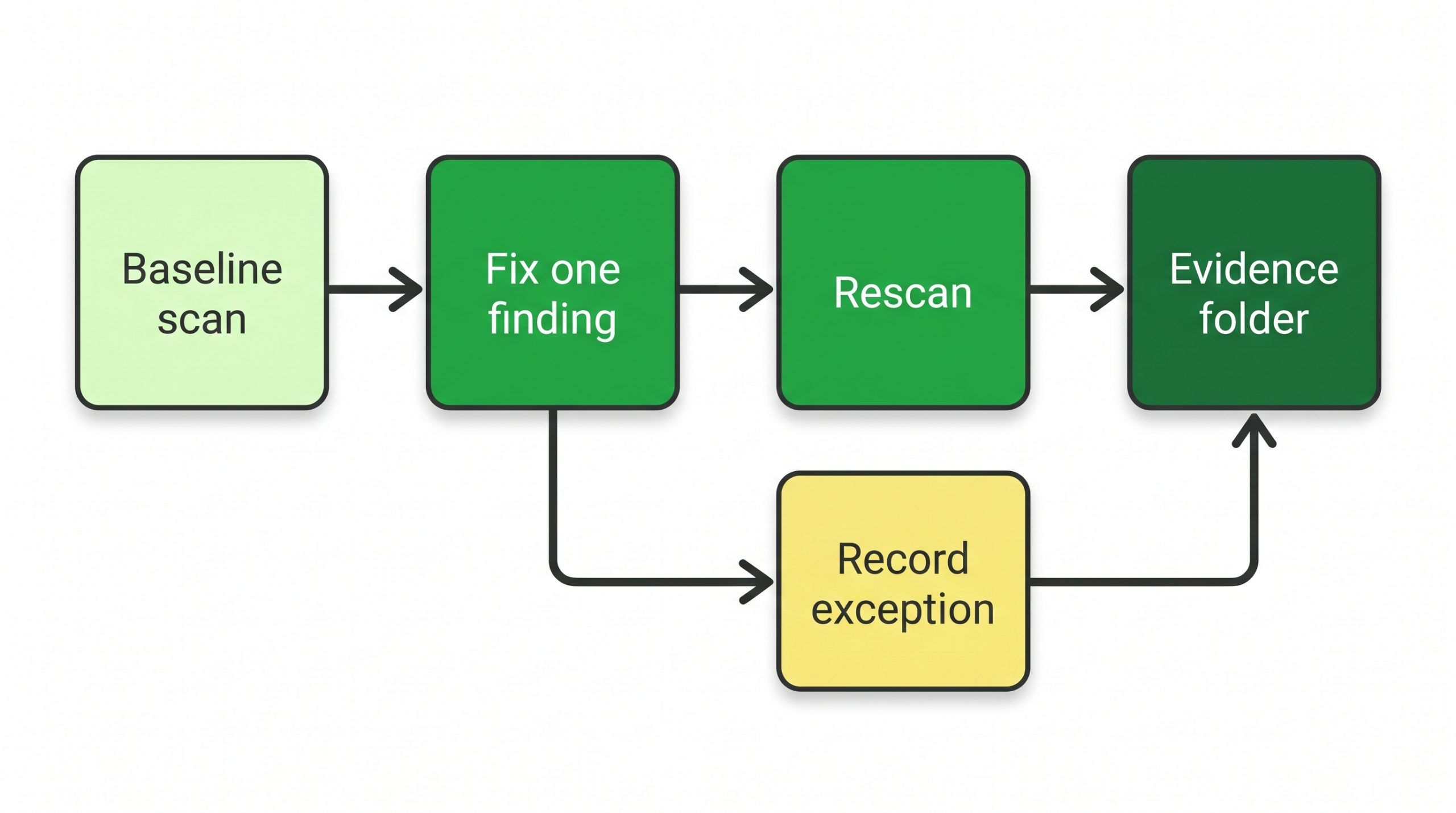
Figure 1. The evidence loop on one server: baseline scan, fix one finding, rescan, and each record exception filed in the same evidence folder as the reports.
WHAT TO VERIFY
|
What to Check After
| Check | Command or page | Expected result |
|---|---|---|
| Admin login | A new SSH session as the admin user | Login succeeds while the old session stays open |
| Application | The site or application health page | Responds as it did before Step 3 |
| Rescan | oscap xccdf eval with –tailoring-file, saved as cis-after | Fewer fail results than cis-before; each remaining fail is in the register |
| Exceptions | oscap info ~/report/tailoring.xml | The customised profile ID is listed |
When to Stop and Hand Over
Stop when a fix breaks the application and nobody can name the setting it depended on. Is anyone on call if the reboot after Step 3 fails at night? Does the same audit also ask how fast patches land? Our post on the emergency patching SLA managed server contracts need covers that side of the audit.
FAQs
Is CIS-CAT Lite enough to scan an AlmaLinux 9 or Ubuntu 24.04 server?
The CIS-CAT coverage guide lists Ubuntu 20.04 LTS v3.0.0 as the only Linux benchmark in CIS-CAT Lite. AlmaLinux OS 9 v3.0.0 and Ubuntu Linux 24.04 LTS v2.0.0 appear under CIS-CAT Pro coverage.
Does oscap –remediate make a server CIS compliant?
No. The AlmaLinux guide states that remediation does not guarantee compliance with a profile if the system configuration has changed. It also says running remediation on production without testing is not recommended.
Is the CIS Benchmark PDF free for a business?
The CIS AlmaLinux OS Benchmarks page says CIS Benchmarks are freely available in PDF format for non-commercial use. Does your use count as non-commercial, or does your organisation hold a CIS SecureSuite membership?
Where the Server Stands Now
The server now has a named CIS baseline, before and after reports, and a written reason for every rule it does not follow.
| NEXT STEP Want a second machine as a test target for hardening changes before they reach production? Compare configurations on our high-performance dedicated servers page. |

