

TL;DR
|
You have picked a dedicated server and decided to run it yourself. That choice makes the operating system and the jobs around it your responsibility. This guide sets out how to manage your own dedicated server as one checklist, in the order server administration and maintenance should happen, with a review of when handing over makes more sense.
It is written for IT business, teams, agencies, developers and system administrators who look after one or a few servers. The examples use Ubuntu Server 24.04 LTS and 26.04 LTS (long-term support) with common open source tools, each linked to its official documentation. On another distribution, check that distribution’s documentation for the equivalent commands.
If you are still deciding who should manage your server, start with our comparison of managed and unmanaged dedicated servers. If you have not yet chosen a hosting type, our guide to shared, virtual private server (VPS) and dedicated hosting explains the differences and helps you evaluate your options. This checklist assumes you have already chosen a dedicated server and decided to manage it yourself.
What Managing Your Own Dedicated Server Involves
Managing a dedicated server yourself means taking responsibility for seven key areas. Each area has a defined starting action and a clear way to verify that the task has been completed. The table lists them in the order this guide follows.
| Job | First action | Done when |
|---|---|---|
| 1. Access | Key-based Secure Shell (SSH) login for a named admin user | Root and password logins are switched off |
| 2. Updates | Confirm unattended-upgrades is active | Security updates install daily and reboots have a slot |
| 3. Firewall | Allow SSH and your service ports only | Uncomplicated Firewall (ufw) is enabled and its rules match your services |
| 4. Backups | Encrypted backup to a second location, plus an offline copy | The job runs on schedule and reports success |
| 5. Monitoring | Metrics and alerts routed to Slack or Telegram | A test alert reaches the person on call |
| 6. Restore drill | Restore the latest backup to a test target | Restored data opens and the restore time is recorded |
| 7. Handover review | Answer the handover questions in this guide | You know whether to keep running it or hand over |
Sources: OpenSSH sshd_config manual, Ubuntu Server documentation, CISA #StopRansomware Guide, Prometheus Alertmanager documentation.
Read the table as a sequence, not a menu. Each step relies on the one before it. A restore drill needs a working backup, and an alert needs monitoring in place. So the next section starts with the login.
How to Manage Your Own Dedicated Server: A Step-by-Step Approach
The first three areas cover access control, system updates and firewall configuration. Complete these steps before installing applications or pointing a domain to your server.
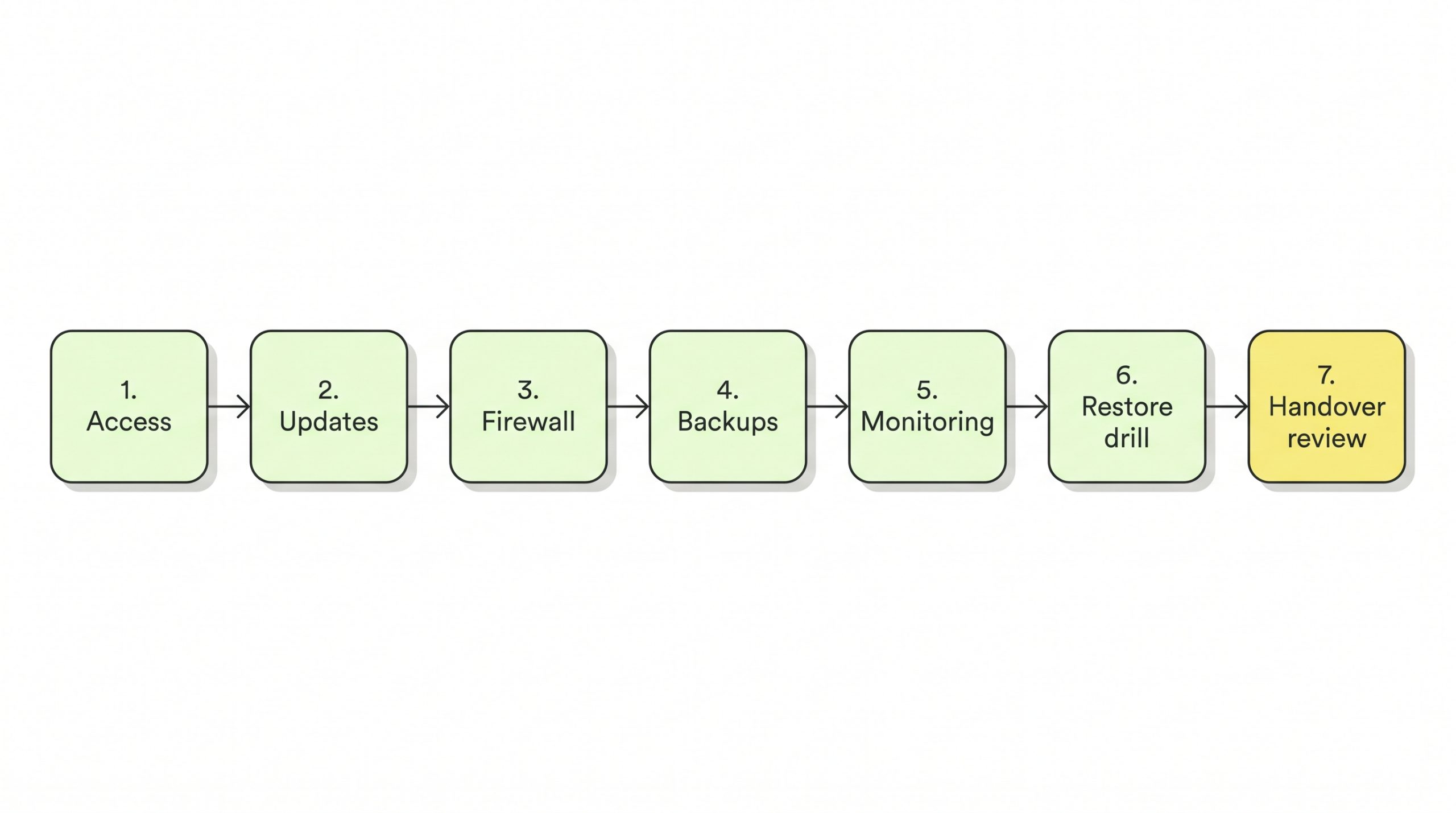
Figure 1. The seven key areas in order, from access to the handover review.
Step 1: Lock down access
The OpenSSH manual lists yes as the default for PasswordAuthentication, so password logins are allowed until you change the setting. That makes SSH the first job.
First, create a named admin user with sudo rights. Then generate a key on your own computer and copy it to the server. The Ubuntu OpenSSH guide creates the key with ssh-keygen -t ed25519 and installs it with ssh-copy-id.
Test the key login in a second terminal while the first session stays open. After that, set PasswordAuthentication to no in /etc/ssh/sshd_config. For PermitRootLogin, OpenSSH gives prohibit-password as the default, and the value no stops root logging in at all.
Reload the SSH service and log in once more as your admin user. If the login fails, the Ubuntu guide’s command sudo journalctl -fu ssh.service shows the live SSH log.
Step 2: Keep the operating system patched
On Ubuntu, security patching is already switched on. According to the Ubuntu Server documentation, unattended-upgrades is installed by default and runs once per day. Your part is to confirm it is active and to read its log in /var/log/unattended-upgrades.
Reboots are the gap. Canonical’s documentation sets Automatic-Reboot to false by default, so the server does not restart itself when an update asks for it. An update that needs a restart therefore waits until the server is rebooted.
Also note the end date of your operating system (OS) release. Ubuntu LTS releases receive 5 years of standard security maintenance. For 24.04 LTS that runs to May 2029, and for 26.04 LTS to May 2031.
Step 3: Turn on the firewall
Ubuntu ships ufw as its host firewall. However, the Ubuntu firewall guide notes that ufw is initially disabled. Until you enable it, ufw stays disabled.
The Ubuntu guide allows SSH first with sudo ufw allow 22. Next come only the ports your applications use, such as 80 and 443 for a web server. The guide then switches the firewall on with sudo ufw enable.
Canonical’s guide also shows how to restrict SSH to one source address. Its example rule is sudo ufw allow proto tcp from 192.168.0.2 to any port 22, with your own office or virtual private network (VPN) address in place of the sample one. To review the result, sudo ufw status numbered lists every rule.
WHAT TO VERIFY
|
Backups, Monitoring and the Restore Drill
Steps 4 to 6 cover backups, monitoring and the restore drill. In India, logging also carries a legal duty, covered after Step 6.
Step 4: Back up to somewhere the server cannot reach
The Cybersecurity and Infrastructure Security Agency (CISA) #StopRansomware Guide advises offline, encrypted backups of critical data, tested regularly. CISA advises keeping backups offline because many ransomware variants try to find and then delete or encrypt backups they can reach.
Does an encrypted copy reach a second location on a schedule? Which databases, application files and configuration does the server hold, and does each one appear in the backup job?
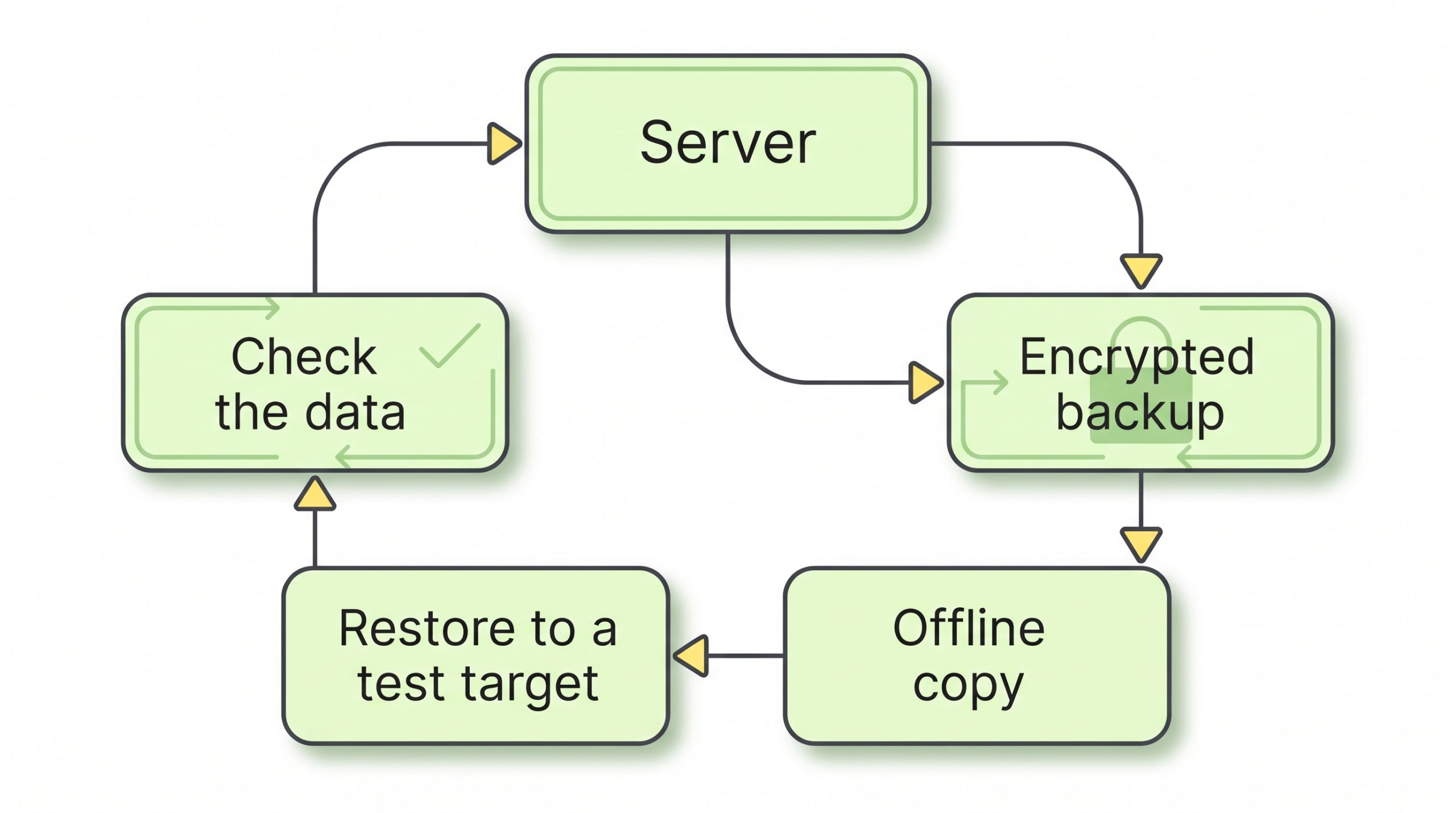
Figure 2. The backup loop in this checklist: server to encrypted backup and offline copy, then a restore to a test target and a data check.
Step 5: Monitor the server and route alerts
Monitoring answers one question: will you hear about a problem before your users report it? Prometheus Alertmanager can send alerts to receivers such as Slack and Telegram.
The Alertmanager configuration reference lists slack_configs and telegram_configs among its receivers. Is the Slack channel or Telegram chat that receives alerts watched by someone? Has a test alert reached it?
Does the alert list also cover disk space, memory, a stopped service and a failed backup job?
Step 6: Run a restore drill
CISA’s guide asks owners to test the availability and integrity of backups in a disaster recovery scenario.
For example, the restic documentation restores a snapshot with restic -r /srv/restic-repo restore 79766175 –target /tmp/restore. It says to use the word latest in place of the snapshot identifier (ID) to restore the latest snapshot (restic 0.19.1 documentation). The restic example restores to a separate target directory, /tmp/restore. After the restore, do the files open, does the database dump load and does the application start against it?
For each drill, was the restore time recorded, and how old was the newest restored data?
CERT-In Logging and Incident Reporting Requirements in India
In India, server logs are also a compliance matter. Directions issued by the Indian Computer Emergency Response Team (CERT-In) on 28 April 2022 cover service providers, intermediaries, data centres, body corporates and Government organisations. As MediaNama reported in November 2026, the CERT-In chief restated that logs must be kept for a rolling period of 180 days within Indian jurisdiction.
That interview also restates the reporting rule. Specified cyber incidents go to CERT-In within six hours of noticing them or being informed of them.
For smaller firms, CERT-In also published 15 Elemental Cyber Defense Controls for Micro, Small, and Medium Enterprises in September 2025, as listed by the Press Information Bureau. Owners of micro, small and medium enterprises (MSMEs) can read those controls alongside this checklist.
WHAT TO VERIFY
|
When Should You Consider Managed Server Support?
Does any handover question below get a no that nobody on the team can fix? The handover review, step 7, checks this for your own server. Each question below checks whether a job has an owner.
| Handover question | What a no means |
|---|---|
| Can someone act on an alert outside office hours? | No one is assigned to act on alerts outside office hours |
| Are pending reboots applied within your patch window? | Updates are installed but not fully applied |
| Has a restore drill run since the last major change? | The current backup is unproven |
| Can someone file a CERT-In report within six hours of noticing an incident? | The reporting duty has no owner |
| Does the workload owner accept the restore time from your last drill? | The restore time has not been accepted by the workload owner |
Sources: Ubuntu Server documentation (reboots), CISA #StopRansomware Guide (restore testing), CERT-In Directions as reported by MediaNama (six-hour reporting).
Which of the seven key areas, if any, would a provider take on, and which would stay with your team? Our data centre managed services checklist sets out which jobs a provider can take on and how to scope them.
Your own situation adds a few more checks. Match your setup to a row below and answer its question.
| If your setup is | Question to check |
|---|---|
| An agency hosting client websites, with one developer who also builds the sites | Who covers alerts and reboots when that developer is on leave? |
| A developer running a side product or a staging environment | How many users would notice if the server stayed down for a day? |
| A small business running its accounting or enterprise resource planning (ERP) database on the server | Does the business accept the restore time from the last drill? |
| A team with a system administrator and an on-call rota | Does your runbook already cover each of the seven jobs? |
This checklist covers one server’s operating system and the jobs around it. It leaves out application security, database tuning and high availability across several servers. The summary below pulls the checklist together.
| Criterion | Why it matters | What to verify |
|---|---|---|
| Access | OpenSSH allows password logins by default | Key login works; PasswordAuthentication and PermitRootLogin set to no |
| Updates | unattended-upgrades does not reboot by default | Pending reboots done in your window; OS end date noted |
| Firewall | ufw is disabled until you enable it | ufw status numbered lists only needed ports |
| Backups | CISA advises offline, encrypted copies | One offline encrypted copy exists |
| Monitoring | Alertmanager can route alerts to Slack or Telegram | A test alert reached the person on call |
| Logs | CERT-In Directions require a rolling 180 days of logs | Retention covers 180 days within India |
| Restore drill | CISA advises testing backups in a recovery scenario | Last drill date and restore time recorded |
Where This Leaves You
Managing your own dedicated server involves seven key responsibilities, each requiring a clear owner, defined tasks and a review schedule. Each area needs regular attention to keep the server secure, updated and reliable.
As part of your review, consider two questions: Can your team complete and maintain every task listed in the summary table? Are monitoring alerts being reviewed and scheduled maintenance drills being performed on time? If either answer is no, revisit the managed support options outlined above to determine whether additional assistance is needed.
| NEXT STEP Choosing the hardware for a server you will run yourself? Compare processor, memory and storage options on our high-performance dedicated servers page. |
FAQs
Can I manage a dedicated server without a control panel?
Yes. Every step in this checklist works over SSH from the command line. If a panel such as cPanel or Plesk is installed, does the panel vendor’s documentation cover changes to SSH or firewall settings?
How often should I update my dedicated server?
On Ubuntu, unattended-upgrades applies security updates once a day by default. To allow non-security updates as well, uncomment the -updates origin in /etc/apt/apt.conf.d/50unattended-upgrades. Plan restarts separately, since automatic reboot is off by default.
Which Ubuntu version should a new dedicated server run?
Canonical recommends LTS releases for production environments. Interim releases get only 9 months of updates. The current LTS, 26.04, was released in April 2026.
Does the CERT-In 180-day log rule apply to a small company’s server?
The Directions list body corporates among the covered entities, alongside service providers and data centres. If your business is a company, ask your legal adviser how the logging and six-hour reporting duties apply to your systems.