| TL;DR Database server requirements follow the working set, not the database size. A 2 TB database with a 90 GB hot set needs roughly 128 GB of RAM, not 2 TB. PostgreSQL, MySQL and MongoDB reserve memory differently out of the box: 25 percent of RAM, 70 to 80 percent, and half of RAM minus 1 GB respectively. Identical hardware behaves differently under each one. Capacity, IOPS, throughput and latency are four separate storage budgets. Write-heavy systems run out of IOPS and p99 latency long before they run out of disk. Core count follows concurrently active queries, not open connections. A connection pooler usually buys more headroom than a larger processor. Growth, replicas, restore time and maintenance headroom change the final configuration more often than the query workload does. |
Most oversized database servers start from a single number: total data volume. Someone reads 2 TB from a storage report, asks for 2 TB of RAM, and gets quoted a machine nobody needs. Most undersized ones start from the same place, with a 200 GB database put on a 32 GB box because the data fits on disk. Database server requirements are set by a different measurement, which is how much of that data the application actually touches in a normal hour, how many queries run at the same instant, and how many physical writes each logical write turns into.
This guide works through the four inputs that decide a configuration, then gives example small, medium and large builds with their assumptions written down, and ends with a checklist to run before anything is ordered.
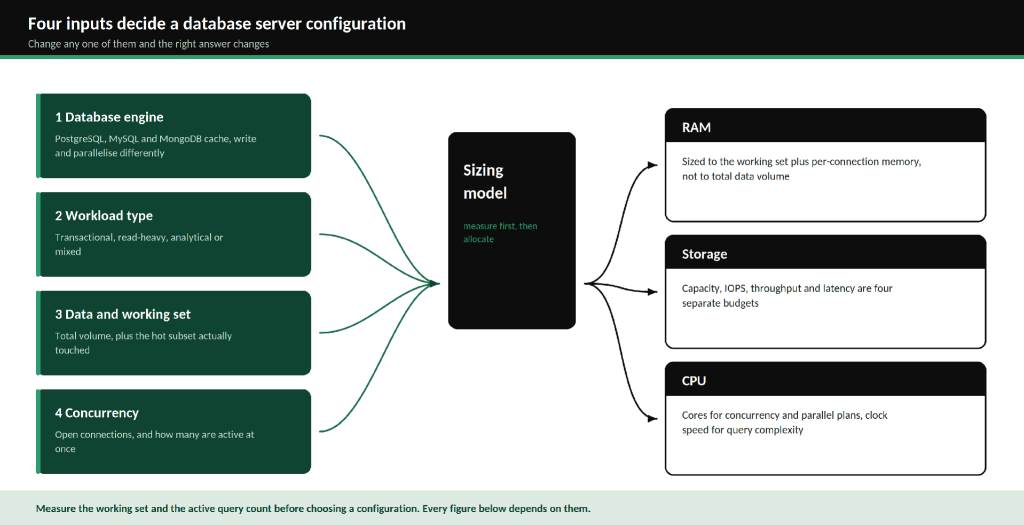
Figure 1. Engine, workload type, working set and concurrency together decide RAM, storage and CPU.
Start with the workload, not the hardware catalogue
Database server requirements come from four inputs, and changing any one of them changes the right answer.
Database engine. PostgreSQL, MySQL and MongoDB cache, write and parallelise in different ways. The same data under a different engine wants a different memory split.
Workload type. Transactional systems run short queries with high concurrency and are usually bound by random read IOPS and commit latency. Read-heavy and analytical systems run long queries over large ranges and are bound by memory bandwidth, sequential throughput and core count.
Data volume and working set. Total volume sets capacity. The working set, meaning the rows and index pages touched in a typical window, sets memory.
Concurrency. Open connections and concurrently executing queries are different numbers, usually by an order of magnitude, and only the second one maps to cores.
How PostgreSQL, MySQL and MongoDB use resources differently
All three keep a hot page cache in RAM and fall back to disk when the working set stops fitting. What differs is how much memory each one claims by default and what it does with the rest.
PostgreSQL deliberately keeps its own buffer modest and relies on the operating system cache underneath it. The documentation recommends shared_buffers at 25 percent of system RAM on a dedicated server, and warns that going past 40 percent is unlikely to help because PostgreSQL also reads through the OS cache.
MySQL takes the opposite approach. InnoDB wants to own the cache, so the common recommendation is to set innodb_buffer_pool_size to 70 to 80 percent of RAM on a dedicated host. The default is 128 MB, which is one of the most frequent causes of a new MySQL server performing worse than the laptop it replaced.
MongoDB splits the difference. WiredTiger defaults its internal cache to the larger of 50 percent of RAM minus 1 GB, or 256 MB, and leans on the filesystem cache for the rest. The distinction matters: collection data sits uncompressed in the WiredTiger cache but compressed in the filesystem cache, so the same gigabyte of RAM holds different amounts of data depending on which layer it lands in.
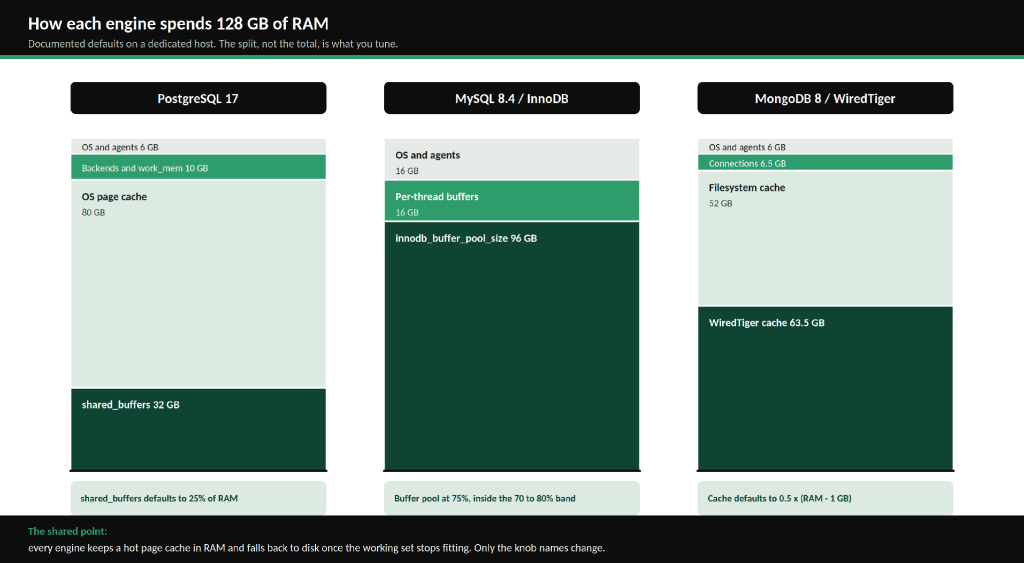
Figure 2. Documented default memory splits on a 128 GB dedicated host.
| Resource | PostgreSQL | MySQL (InnoDB) | MongoDB (WiredTiger) |
|---|---|---|---|
| Primary cache | shared_buffers, 25% default | Buffer pool, 70 to 80% | WiredTiger cache, 0.5 x (RAM – 1 GB) |
| Second cache layer | OS page cache, significant | Minor | Filesystem cache, holds compressed pages |
| Connection model | One OS process per connection | One thread per connection | One thread per connection |
| Per-connection memory | Backend plus work_mem per sort or hash node | sort, join and read buffers per thread | Stack plus cursor buffers per thread |
| Intra-query parallelism | Yes, workers per gather node | Limited | Across shards, not within a node |
| Transactional pressure point | Connection count and WAL flush | Buffer pool hit rate and redo log | Cache pressure and eviction |
| Read-heavy pressure point | work_mem and parallel workers | Buffer pool size | Cache size and decompression CPU |
For transactional work, all three are dominated by random reads against indexes and by commit durability. For read-heavy and analytical work, PostgreSQL gains the most from extra cores because it can split a single query across workers, MySQL gains the least, and MongoDB gains in proportion to how much of the aggregation pipeline can run in memory.
RAM: size the working set, not the database
The working set is the subset of rows and index pages your queries touch in a normal window. For an orders system, that is usually the last few months of transactions plus every index that supports a lookup, which can be a small fraction of a large table or very nearly all of a small one.
Take a 2 TB order history where the last 90 days account for 30 GB of rows, the indexes total 55 GB, and reference tables add 5 GB. The working set is roughly 90 GB. On a 128 GB machine that fits with headroom for connections and the OS. On a 64 GB machine it does not, and the shortfall shows up as read IOPS rather than as an error message.
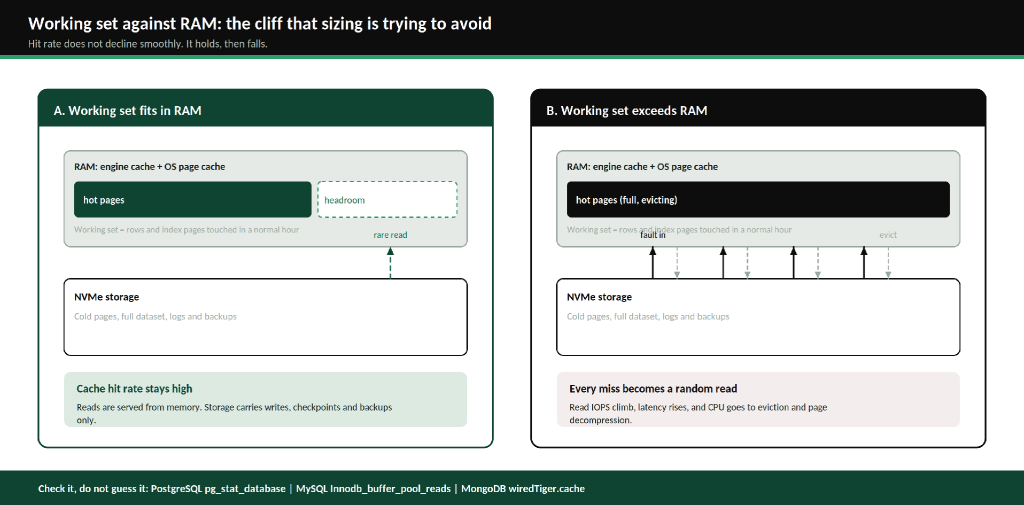
Figure 3. Hit rate does not decline gradually as the working set grows past memory. It holds, then falls.
Cache hit rate is a measurement, not an estimate
Each engine exposes the number directly. PostgreSQL reports blks_hit and blks_read in pg_stat_database. MySQL reports Innodb_buffer_pool_read_requests against Innodb_buffer_pool_reads. MongoDB reports cache bytes and page faults under serverStatus().wiredTiger.cache. Sample over a full business week, including the month-end batch, rather than on a quiet afternoon.
Indexes compete for the same memory
Index pages live in the same cache as table pages. A table with eight indexes spends cache on all eight, and every write updates all eight. Dropping an unused index returns memory and write IOPS at the same time, which is why an index audit is usually cheaper than a RAM upgrade.
Concurrent connections cost memory before they cost CPU
This is where the three engines diverge most. PostgreSQL forks an operating system process per connection, and work_mem is applied per sort or hash operation rather than per query, so a complex query with several hash joins can consume several multiples of the setting, and each parallel worker gets its own allowance. The default work_mem of 4 MB looks harmless until 300 connections each run a three-way hash join.
The fix is a pooler rather than more RAM. PgBouncer in transaction mode lets 2,000 application connections share 100 or so server connections. MySQL and MongoDB use threads rather than processes, which is lighter, but both still allocate per-connection buffers, and the MongoDB documentation is explicit that too many open connections reduce the memory available to the working set.
Storage: four numbers, four different limits
Storage is the part of database server requirements that most often goes wrong, because a single specification sheet number gets treated as the whole answer.
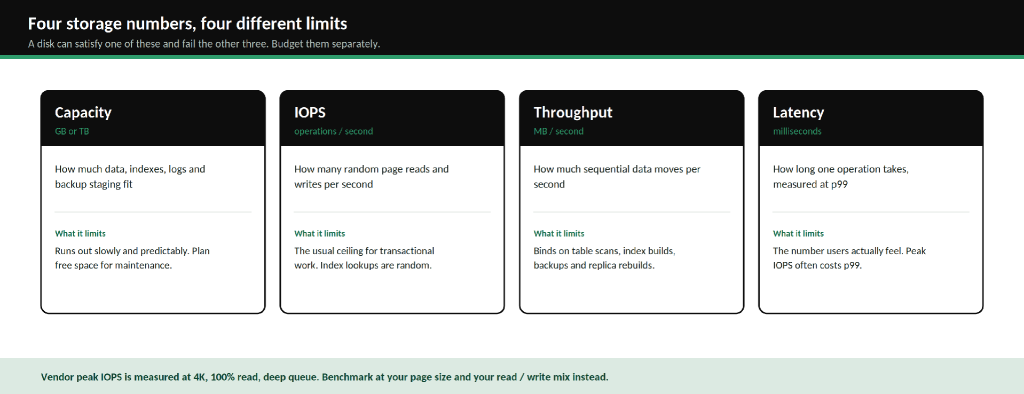
Figure 4. Capacity, IOPS, throughput and latency constrain different parts of the workload.
Capacity has to cover more than the data. Budget for the data, every index, the write-ahead log or redo log or oplog, table bloat between maintenance runs, backup staging space, and growth over the planning horizon. Plan to stay below about 70 percent utilisation, because index rebuilds and table rewrites need free space roughly equal to the object being rewritten. A 300 GB table reorganised online wants another 300 GB free while it runs.
IOPS is the usual ceiling for transactional work, because index traversal produces random single-page reads. PostgreSQL reads in 8 KB pages by default and InnoDB in 16 KB pages, so a device rated at a peak 4 KB figure will deliver materially less at the page size your engine actually uses.
Throughput in MB per second binds on anything sequential: table scans, index builds, nightly backups, and rebuilding a replica from scratch. It is frequently the number that decides how long a disaster recovery drill takes.
Latency is the number users feel, and the one to measure at p99 rather than as an average. A configuration tuned for peak IOPS at deep queue depth often has a worse p99 than one tuned for a shallower queue, because the queue itself becomes the wait.
Write-heavy workloads need physical write figures, not transaction rates
A single committed row does not produce a single write. It produces a durable log record flushed at commit, the data page itself written at the next checkpoint, one page write for every index covering a changed column, and engine-specific overhead on top: full-page images after a PostgreSQL checkpoint, the InnoDB doublewrite buffer, the MongoDB oplog entry.
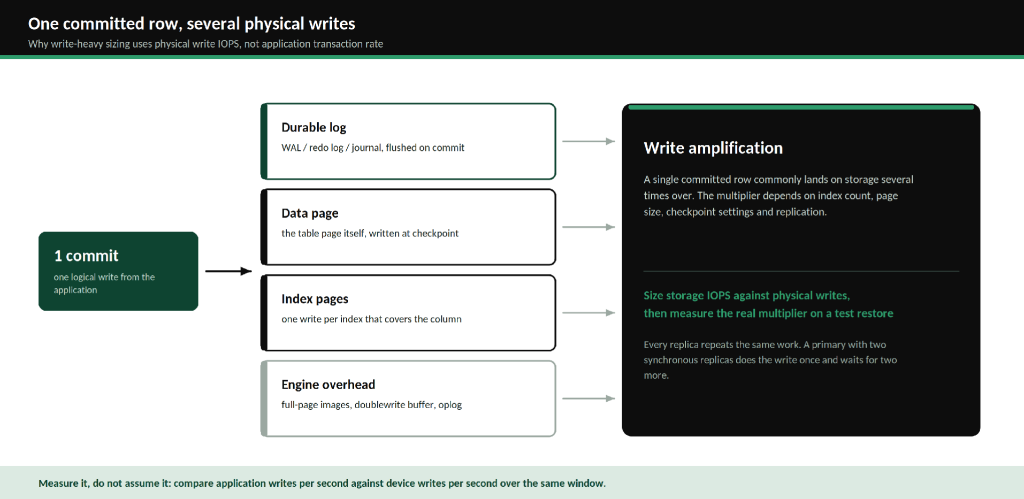
Figure 5. Write amplification is why the application transaction rate is the wrong input for IOPS sizing.
The practical consequence is that an application doing 2,000 writes per second is not asking the device for 2,000 IOPS. Measure the real multiplier by comparing application writes per second against device writes per second over the same window, on a representative dataset, before fixing a storage figure. Replication multiplies it again, since every replica repeats the primary’s write work on its own storage.
CPU: cores for concurrency, clock for query complexity
Three things drive the CPU side of database server requirements, and they pull in different directions.
Query complexity. Joins, aggregations, sorts that spill, JSON parsing, TLS termination and page decompression are all CPU work. MongoDB’s compression is a worked example: every cache miss that reads from the filesystem cache has to decompress the page, so cache pressure shows up as CPU load as well as I/O load.
Concurrency. Size against queries running at the same instant, not against connections. A system with 2,000 application connections, 120 pooled server connections and 24 concurrently active queries is a 16-core problem, not a 2,000-core one.
Parallel execution. PostgreSQL launches two workers per gather node by default, and the documentation warns that a four-worker query can use up to five times the CPU, memory and I/O of the same query run alone. That is useful for analytics and ruinous if the setting is raised on an OLTP system where fifty such queries can run together. MySQL offers limited single-query parallelism. MongoDB parallelises across shards rather than within one node.
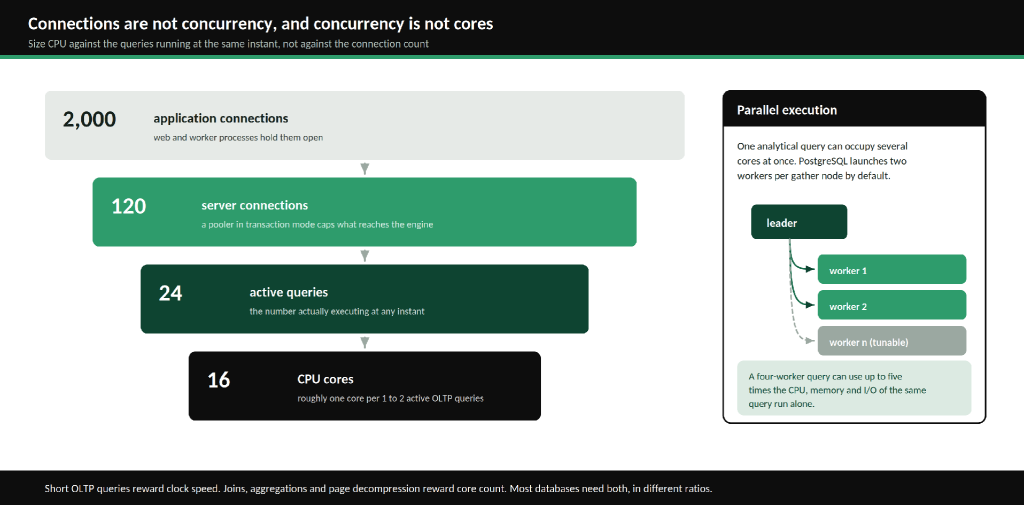
Figure 6. The funnel from application connections down to cores.
Short transactional queries reward higher clock speed, since each one is a short serial chain of work. Analytical queries reward core count. Most production systems need both, and the ratio is what differs.
Example configurations for small, medium and large workloads
These are illustrative starting points, not quotes, and every one of them should be checked against measured figures before anything is ordered.
| Assumptions behind the table Linux on bare metal, with the database as the only significant workload on the host. NVMe storage in RAID 10, with backups written to separate storage. A connection pooler in front of PostgreSQL. A single primary with one asynchronous replica for the medium and large tiers. Working set figures taken from a measured cache hit rate above 95 percent at steady state. |
| Small | Medium | Large | |
|---|---|---|---|
| Data volume | Up to 100 GB | 100 GB to 1 TB | 1 TB to 10 TB |
| Working set | Up to 16 GB | 48 to 96 GB | 200 to 400 GB |
| Pooled server connections | Up to 50 | 100 to 200 | 300 to 600 |
| Concurrently active queries | Up to 10 | 20 to 60 | 60 to 200 |
| Write rate (logical) | Under 500 per second | 500 to 5,000 per second | Above 5,000 per second |
| RAM | 32 to 64 GB ECC | 128 to 256 GB ECC | 512 GB to 1 TB ECC |
| CPU | 8 to 12 cores, high clock | 16 to 32 cores | 32 to 64 cores |
| Storage capacity | 2 x 960 GB NVMe, RAID 1 | 4 x 1.92 TB NVMe, RAID 10 | 8 x 3.84 TB NVMe, RAID 10 |
| Sustained random IOPS target | 10,000 to 20,000 | 50,000 to 150,000 | 200,000 and above |
| Availability shape | Single node plus backups | Primary and replica | Primary, replicas, automated failover |
The pattern worth reading out of that table is that RAM scales with the working set rather than with data volume, and the storage column scales on two axes at once. The large tier needs eight devices as much for parallel IOPS and rebuild speed as for capacity.
Engine-specific adjustments on top: PostgreSQL needs a pooler before it needs the next RAM tier once connections pass a few hundred. MySQL benefits from multiple buffer pool instances once the pool is large. MongoDB replica set members each need RAM sized for the same working set, because a secondary that cannot hold it will not be a usable failover target.
A database server requirements checklist
Run this before ordering. Most items cost nothing but measurement time, and each one can move the final database server requirements.
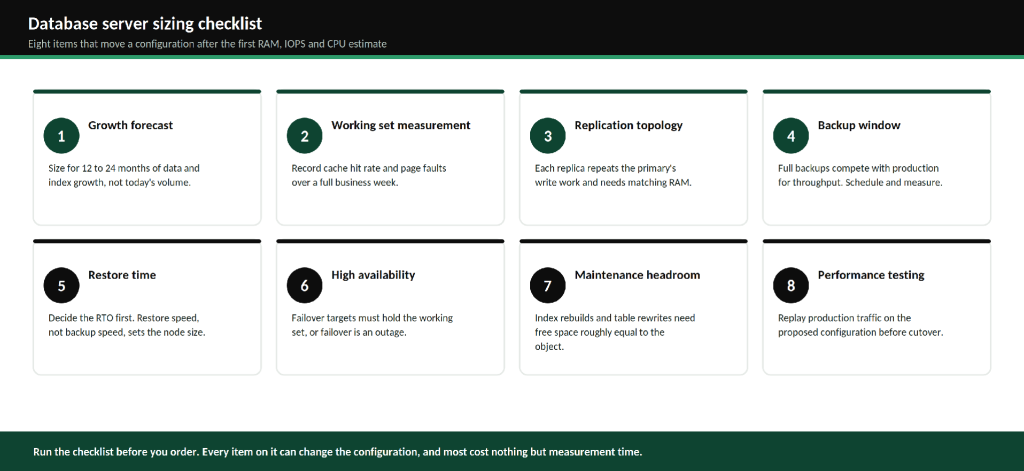
Figure 7. Eight checks that commonly change a configuration after the first estimate.
| Check | Why it matters | What to verify |
|---|---|---|
| Growth forecast | Data and indexes grow faster than row counts suggest | Measured monthly growth in GB over the last 12 months, projected 24 months out |
| Working set | Sets the RAM figure | Cache hit rate and page faults sampled across a full business week including peaks |
| Replication topology | Replicas repeat the primary’s write work | Replica RAM matches the working set, and replication lag under peak write rate |
| Backup window | Backups compete with production for throughput | Full backup duration, its effect on p99 latency, and where backups are written |
| Restore time | Restore speed sets the node size, not backup speed | A timed restore of a production-sized dataset against the stated RTO |
| High availability | A failover target that cannot hold the working set is an outage | Failover tested under load, not on an idle system |
| Maintenance headroom | Rebuilds need free space roughly equal to the object | Free space at peak, and the largest single table or index |
| Performance testing | The only check that catches the others | Production traffic replayed against the proposed configuration before cutover |
Where the hosting decision changes the numbers
Two things about the platform feed directly back into sizing. Shared virtual infrastructure gives variable IOPS and variable p99 latency, which means the storage figures above have to be padded to absorb a neighbour’s backup job. Dedicated hardware removes that variance, which is why database sizing on dedicated database servers can be done against measured numbers rather than against a worst case.
The second is operational. The checklist above is mostly measurement work: baselining the working set, timing a restore, testing failover under load. If that work is not going to get done internally, managed database services covering tuning, backup verification and capacity planning are usually the cheaper option, because an untested restore is the most expensive item on the list. RackBank’s high-performance dedicated servers are configured to order across the RAM and NVMe ranges in the table above, with the database engines themselves deployed as single nodes, primary and replica pairs, or clusters.
Frequently asked questions
How much RAM does a PostgreSQL server need?
Enough to hold the working set plus per-connection memory and the operating system. Measure the working set from the cache hit rate in pg_stat_database rather than estimating it from database size. PostgreSQL then takes 25 percent of that RAM for shared_buffers by default and reads through the OS page cache for the rest, so both layers need to be budgeted.
How many IOPS does a database server need?
Size against measured physical IOPS at the engine’s page size, not against the application transaction rate. Every committed row also writes a log record, index pages and engine overhead, so physical writes commonly run several times the logical write count. Transactional systems typically need tens of thousands of sustained random IOPS, with p99 latency watched as closely as the IOPS figure.
How many CPU cores does a MySQL database server need?
Count concurrently active queries rather than open connections, and start from roughly one core per one to two active queries for transactional work. MySQL offers limited parallelism within a single query, so extra cores mainly serve concurrency. Higher clock speed helps more than extra cores on short OLTP queries.
How do you calculate MongoDB working set size?
Add the frequently accessed documents to the indexes that serve them, then confirm against serverStatus().wiredTiger.cache and the page fault rate under real load. Remember that WiredTiger holds collection data uncompressed in its internal cache while the filesystem cache holds it compressed, so the two layers do not hold equal amounts per gigabyte.
What are the minimum server requirements for a production database?
Minimum database server requirements for a small production workload under 100 GB are around 32 GB of ECC RAM, 8 cores and NVMe storage in RAID 1, with backups written elsewhere and a tested restore. Below that, the first busy period tends to expose it. The floor rises with the working set, not with the dataset.
Conclusion
Database server requirements come down to four measurements and a checklist, and almost all of the cost of getting it wrong sits in two of them: a working set that does not fit in memory, and a write rate measured in transactions rather than in physical IOPS. Both are measurable on the system you already run, before a quote is requested. The configurations in this guide are starting points for that conversation, and the assumptions behind them are written down so they can be argued with.
| Next step: take your measured working set, physical write rate and peak active query count to the RackBank database server team and have a configuration built against those numbers. If the measurements are not in hand yet, the sizing checklist above is the place to start. |