

TL;DR
|
This guide covers a WooCommerce dedicated server setup with Nginx and PHP-FPM, for the owner or admin who holds root on one server.
We wrote it against Ubuntu 24.04 LTS, the release used in our owner’s checklist for your own dedicated server, with PHP 8.3 FPM, MariaDB 10.6 or later, Nginx, Redis, WordPress 6.9 and WooCommerce 10.8. Those versions follow the WooCommerce server recommendations, which list PHP 8.3 or greater, MariaDB 10.6 or greater and a 256 MB WordPress memory limit. Patching, firewall and log duties sit in that checklist, so this post stays on the store stack.
BEFORE YOU START
|
Step 1: Give the Store Its Own PHP-FPM Pool
PHP-FPM runs PHP in pools of child processes. The PHP manual states that pm.max_children sets the limit on the number of simultaneous requests a pool serves. A separate pool keeps the store’s limits apart from any other site on the server.
Create a pool file named woo.conf in the PHP 8.3 FPM pool directory. The values are an example to size.
[woo]
user = www-data
group = www-data
listen = /run/php/woo.sock
listen.owner = www-data
listen.group = www-data
pm = dynamic
pm.max_children = 20
pm.min_spare_servers = 2
pm.max_spare_servers = 6
pm.status_path = /fpm-status
php_admin_value[memory_limit] = 256M
Check pm.max_children before you save. Does 20 times the 256M memory_limit, or 5,120 MB, fit in the RAM left after MariaDB and Redis? If not, lower the count.
Apply it with sudo systemctl reload php8.3-fpm, then run ls -l /run/php/woo.sock. The socket should exist and belong to www-data. If it is missing, journalctl -u php8.3-fpm shows the line the pool rejected. To undo, delete woo.conf and reload again.
Step 2: WooCommerce Nginx and PHP-FPM Settings That Keep Cart and Checkout Out of the Cache
The WordPress Nginx handbook notes that the upstream server should match the listen directive in the PHP-FPM pool. The config below keeps its fastcgi_cache skip rules in full and appends the WooCommerce pages and cookies.
First, add this file in the http context, for example /etc/nginx/conf.d/woo-cache.conf:
upstream woo_php {
    server unix:/run/php/woo.sock;
}
fastcgi_cache_path /var/run/nginx-cache levels=1:2 keys_zone=WORDPRESS:500m inactive=60m;
fastcgi_cache_key "$scheme$request_method$host$request_uri";
Next, add the skip rules and PHP handling inside the store’s server block:
set $no_cache 0;
if ($request_method = POST) { set $no_cache 1; }
if ($query_string != "") { set $no_cache 1; }
if ($request_uri ~* "(/wp-admin/|/xmlrpc.php|/wp-(app|cron|login|register|mail).php|wp-.*.php|/feed/|index.php|wp-comments-popup.php|wp-links-opml.php|wp-locations.php|sitemap(_index)?.xml|[a-z0-9_-]+-sitemap([0-9]+)?.xml|/cart/|/checkout/|/my-account/)") { set $no_cache 1; }
if ($http_cookie ~* "comment_author|wordpress_[a-f0-9]+|wp-postpass|wordpress_no_cache|wordpress_logged_in|woocommerce_items_in_cart|woocommerce_cart_hash|wp_woocommerce_session_") { set $no_cache 1; }

location / {
    try_files $uri $uri/ /index.php?$args;
}
location = /fpm-status {
    allow 127.0.0.1;
    deny all;
    include fastcgi.conf;
    fastcgi_pass woo_php;
}
location ~ \.php$ {
    try_files $uri =404;
    include fastcgi.conf;
    fastcgi_pass woo_php;
    fastcgi_cache_bypass $no_cache;
    fastcgi_no_cache $no_cache;
    fastcgi_cache WORDPRESS;
    fastcgi_cache_valid 200 60m;
}
The try_files $uri =404 line is the safeguard the handbook puts in its PHP blocks. The page and cookie names come from WooCommerce itself. Its caching guide lists Cart, My Account and Checkout as pages to exclude from the cache. It also names the three cart and session cookies used above.
If the store renamed its cart, checkout or my-account pages, change the request_uri line to match.
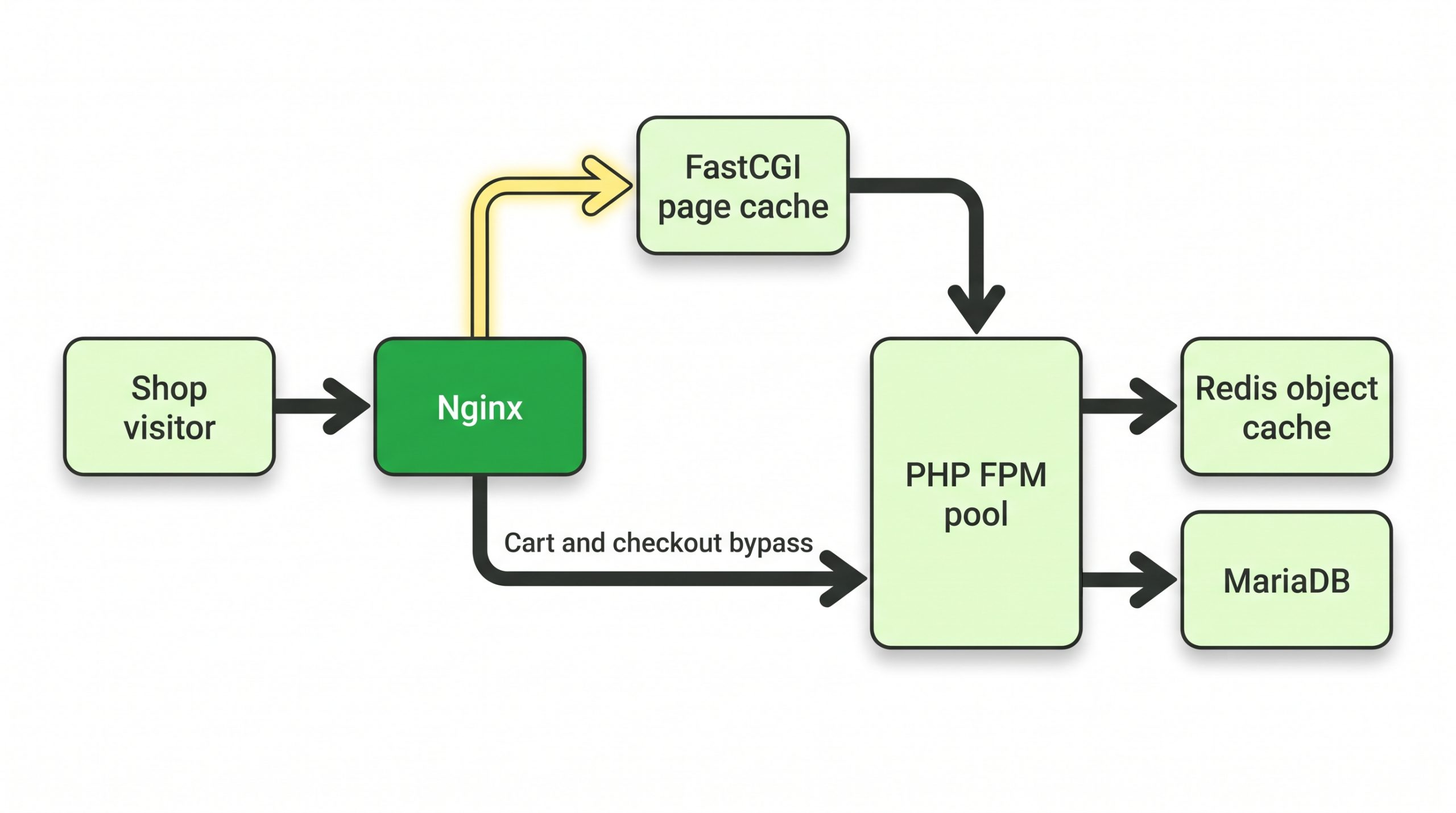
Figure 1. Catalogue requests can come from the FastCGI page cache. Cart and checkout requests bypass it and reach the PHP-FPM pool, which uses Redis and MariaDB.
Test with sudo nginx -t. The output should say the syntax is ok and the test is successful; then run sudo systemctl reload nginx. A failed test names the file and line to fix. To undo, copy /root/nginx-backup back and reload.
Step 3: Add a Redis Object Cache With a Memory Cap
Before an object cache plugin goes on, cap the memory Redis may use. The Redis documentation says a maxmemory of zero, the default on 64-bit systems, means no memory limit. Add two lines to redis.conf, sized to fit beside MariaDB and the PHP pool:
maxmemory 512mb
maxmemory-policy allkeys-lru
Redis describes allkeys-lru as a good default when there is no reason to prefer another policy. Redis reads redis.conf at startup, so restart the Redis service to load both lines. The documented redis-cli CONFIG SET maxmemory 512mb changes only the cap at runtime, not the policy.
Then install a Redis object cache plugin and enable it from its own settings page. WooCommerce suggests excluding _wc_session_ from database caching where the caching system offers that option. Check with redis-cli INFO memory, which should show the limit you set. To undo, disable the plugin, copy redis.conf.bak back and restart Redis.
Step 4: Take Consistent Database and File Backups
Does the dump block orders while it runs? The MariaDB documentation says –single-transaction dumps the consistent state of the database without blocking any applications. That holds only for InnoDB tables, so confirm the store’s tables use InnoDB.
Put the dump in a script such as /usr/local/bin/woo-backup.sh and make it executable with sudo chmod +x:
#!/bin/sh
mariadb-dump --single-transaction store_db | gzip > /backup/store_db-$(date +%F).sql.gz
Then add this line with sudo crontab -e to run it at 02:00 every night:
0 2 * * * /usr/local/bin/woo-backup.shRun the script once by hand, then run ls -lh /backup. Today’s file should be there with a non-zero size. Three questions finish the plan:
- How many days of dumps stay in /backup before old files are deleted?
- Does a copy leave this server every night?
- Does the file backup tool also cover wp-config.php and the wp-content folder?
The MariaDB documentation restores with mariadb db_name < backup-file.sql. On a test server, pipe gunzip -c of the latest dump into mariadb store_db.
What to Check After
| Check | Command or page | Expected result |
|---|---|---|
| Pool is running | ls -l /run/php/woo.sock | Socket exists, owned by www-data |
| Pool status page | curl -H “Host: yourstore” http://127.0.0.1/fpm-status | Status page for pool woo; refused from outside |
| Cart stays private | Add an item in two browsers, open Checkout in each | Each browser sees only its own cart |
| Redis cap | redis-cli INFO memory | Limit matches the value set |
| Nightly dump | ls -lh /backup | Today’s file, non-zero size |
| Restore drill | gunzip -c latest dump piped to mariadb store_db on a test server | Store opens with recent orders |
When to Stop and Hand Over
Before a large sale, ask three questions about this set-up:
- Does the status page show the pool reaching pm.max_children at peak, even after resizing?
- Does the store need a database replica or a second web node?
- Is someone on call when checkout fails at 2 AM?
Would a yes to the second question, or a no to the third, mean handing over to managed support? Who handles plugin conflicts and slow queries: the plugin vendor, a DBA or managed support? Our guide to managed versus unmanaged dedicated servers sets out that trade-off.
FAQs
Why does Nginx give 502 after changing the PHP-FPM pool?
The socket path in the Nginx upstream must match the listen line in the pool file. On Linux, the PHP manual adds that the socket needs read and write permission for the web server, which listen.owner and listen.group set.
Should WooCommerce cart and checkout pages be cached?
No. WooCommerce notes that WP Super Cache skips Cart, Checkout and My Account by default. The skip rules in step 2 exclude those pages and cookies from the Nginx FastCGI cache.
How do pm static, dynamic and ondemand differ?
The PHP manual describes static as a fixed number of children equal to pm.max_children. Under dynamic, the child count follows pm.max_children, pm.start_servers, pm.min_spare_servers and pm.max_spare_servers. Under ondemand, idle children stop after pm.process_idle_timeout, which defaults to 10 seconds.
The Result
The store now has its own PHP pool, a page cache that never serves another shopper’s cart, a capped Redis cache and a nightly consistent dump.
| NEXT STEP To run this stack on hardware sized for your catalogue and order volume, see RackBank dedicated and bare metal servers. |