TL;DR
|
The PostgreSQL 14 end of life upgrade is due by 12 Nov 2026. The PostgreSQL Global Development Group said PostgreSQL 14 will stop receiving fixes on that date, and its 13 Aug 2026 release announcement asked anyone running 14 in production to plan an upgrade to a supported version.
This guide is for infrastructure and database leads who run PostgreSQL 14 themselves, on their own servers or on dedicated hardware in an Indian datacentre. It covers three decisions: which version to move to, whether to cut over with pg_upgrade or logical replication, and whether the upgrade is the moment to move the database onto a new dedicated server.
The detailed sizing methodology is covered separately in our database server capacity planning guide, which explains how to determine central processing unit (CPU), random access memory (RAM), and storage requirements based on measured workloads. This article focuses on evaluating the PostgreSQL upgrade path and planning a smooth cutover.
What happens to Self-Hosted PostgreSQL 14 After 12 Nov 2026?
What ends is the supply of community fixes. Under the project’s versioning policy, a major version is supported for 5 years after its initial release, then a final minor version ships and the version becomes unsupported. PostgreSQL 14 first shipped on 30 Sep 2021 and its final release is listed for 12 Nov 2026; the current minor is 14.24.
The 13 Aug 2026 release of 14.24 and its sibling versions closed 28 security vulnerabilities and over 110 bugs, according to the PostgreSQL Global Development Group. A vulnerability found in version 14 after 12 Nov 2026 will have no community fix.
For commercial banks in India the expectation is written down. The Reserve Bank of India (RBI) Commercial Banks Cybersecurity, Technology: Risk, Resilience and Assurance Framework Directions, 2026, dated 31 Jul 2026 and updated as on 01 Oct 2026, apply to commercial banks, not to Small Finance, Payments or Local Area Banks. They ask banks to avoid outdated and unsupported software, and paragraphs 37 and 38 cover monitoring software end-of-support (EOS) dates and keeping a technology refresh plan that replaces software before it reaches EOS.
WHAT TO VERIFY
|
Choosing the Target Version and Upgrade Method for PostgreSQL 14 End of Life
The target version sets how long until the next forced upgrade: about one year on 15, two on 16, three on 17 and four on 18, going by the project’s published final release dates. The method follows from where the new version will run: pg_upgrade migrates an installation in place, while logical replication builds a second cluster that can sit on another machine.
Which version to target
| Target | Final community release | Runway from 12 Nov 2026 | Points to check |
|---|---|---|---|
| PostgreSQL 15 | 11 Nov 2027 | About 1 year | Does a vendor application certify only up to 15? |
| PostgreSQL 16 | 9 Nov 2028 | About 2 years | Same certification check for 16 |
| PostgreSQL 17 | 8 Nov 2029 | About 3 years | From 17 onward, pg_upgrade keeps logical replication slots and subscriptions |
| PostgreSQL 18 | 14 Nov 2030 | About 4 years | Data checksums on by default; MD5 passwords deprecated |
Sources: PostgreSQL versioning policy (as of 03 Nov 2026); PostgreSQL 17 and 18 release notes.
Version 18 changes more than the support date. Its release notes list an asynchronous input/output (I/O) subsystem for sequential scans, bitmap heap scans and vacuums, and pg_upgrade now retains optimizer statistics. They also flag two compatibility points: initdb now enables data checksums by default, and because pg_upgrade requires matching checksum settings, a 14 cluster without checksums needs the new cluster created with --no-data-checksums. MD5 password authentication is deprecated and will be removed in a future major version.
Version 17 is the first whose upgrades carry logical replication state forward. The PostgreSQL 17 release notes state that pg_upgrade migrating logical slots and subscriptions only works for old clusters on version 17 or later, so a 14 source does not benefit, but the upgrade after this one will. Jumping straight from 14 to 18 is allowed, and the versioning policy recommends reading the release notes of every intervening major version first. PostgreSQL 19 is at release candidate stage, with RC 1 released on 15 Oct 2026, and is not yet in the supported releases table.
pg_upgrade: Faster Upgrades, Mode-Dependent Rollback
The PostgreSQL documentation on upgrading a cluster describes dump and restore as the traditional but slow method, and says pg_upgrade upgrades can be performed in minutes, particularly with --link mode. The mode decides whether PostgreSQL 14 survives as a way back, as the pg_upgrade reference sets out:
- Copy (the default) copies files to the new cluster and leaves the old cluster unmodified, so it can be restarted.
- Link uses hard links: faster and less disk space, but the old cluster cannot be accessed once the new cluster has been started.
- Clone gives link-like speed and space while leaving the old cluster usable; it needs both data directories on one file system and, on Linux, kernel 4.5 or later with Btrfs or XFS created with reflink support.
- Swap can outperform the other modes on clusters with many relations, but once the file transfer begins the old cluster is destructively modified.
pg_upgrade --check runs only the compatibility checks, even while the old server is running, and lists the manual adjustments needed afterwards. The reference notes that passing the mode flag planned for the real run enables mode-specific checks.
Logical Replication: New Server, Faster Cutover, More Preparation
The same upgrading chapter describes building a standby on the new version with logical replication, on the same computer or a different one, then switching primaries; it says such a switch-over results in only several seconds of downtime. The cost is preparation, because the logical replication restrictions are real: schema and data definition language (DDL) changes are not replicated, sequence data is not replicated, large objects are not replicated, and only tables replicate.
Updates and deletes need a key. The documentation on publications and replica identity says a published table must have a replica identity to replicate UPDATE and DELETE operations; the default is the primary key, and replica identity FULL is described as a fallback because subscriber-side searches can be very inefficient without a suitable index.
| Criterion | pg_upgrade | Logical Replication |
|---|---|---|
| Where the new version runs | Same server | New dedicated server, or a second cluster on the same one |
| Downtime | Minutes, particularly in link mode | Several seconds at switch-over |
| Extra storage | Copy mode needs room for a second copy of the data files; link and clone need less | Needs space for the new cluster and potentially retained WAL on the publisher. |
| Way back | Copy or clone: restart the old cluster. Link: if the new cluster was never started, remove the .old suffix from global/pg_control. A link run aborted before linking started, or a swap run aborted before pg_upgrade reports the old cluster unsafe to start, leaves the old cluster unmodified. Restore from backup once the new cluster has started (link) or pg_upgrade reports the old cluster unsafe to start (swap) | Does not automatically replicate writes from the new primary back to PostgreSQL 14. |
Sources: PostgreSQL 18 documentation, pg_upgrade, Upgrading a PostgreSQL Cluster, Logical Replication Restrictions and Publication pages.
Does the database use large objects, which logical replication does not carry? How many tables lack a primary key, and can replica identity FULL carry their updates and deletes at an acceptable cost? Is a downtime of minutes acceptable, or only seconds, and is the server itself due for replacement?
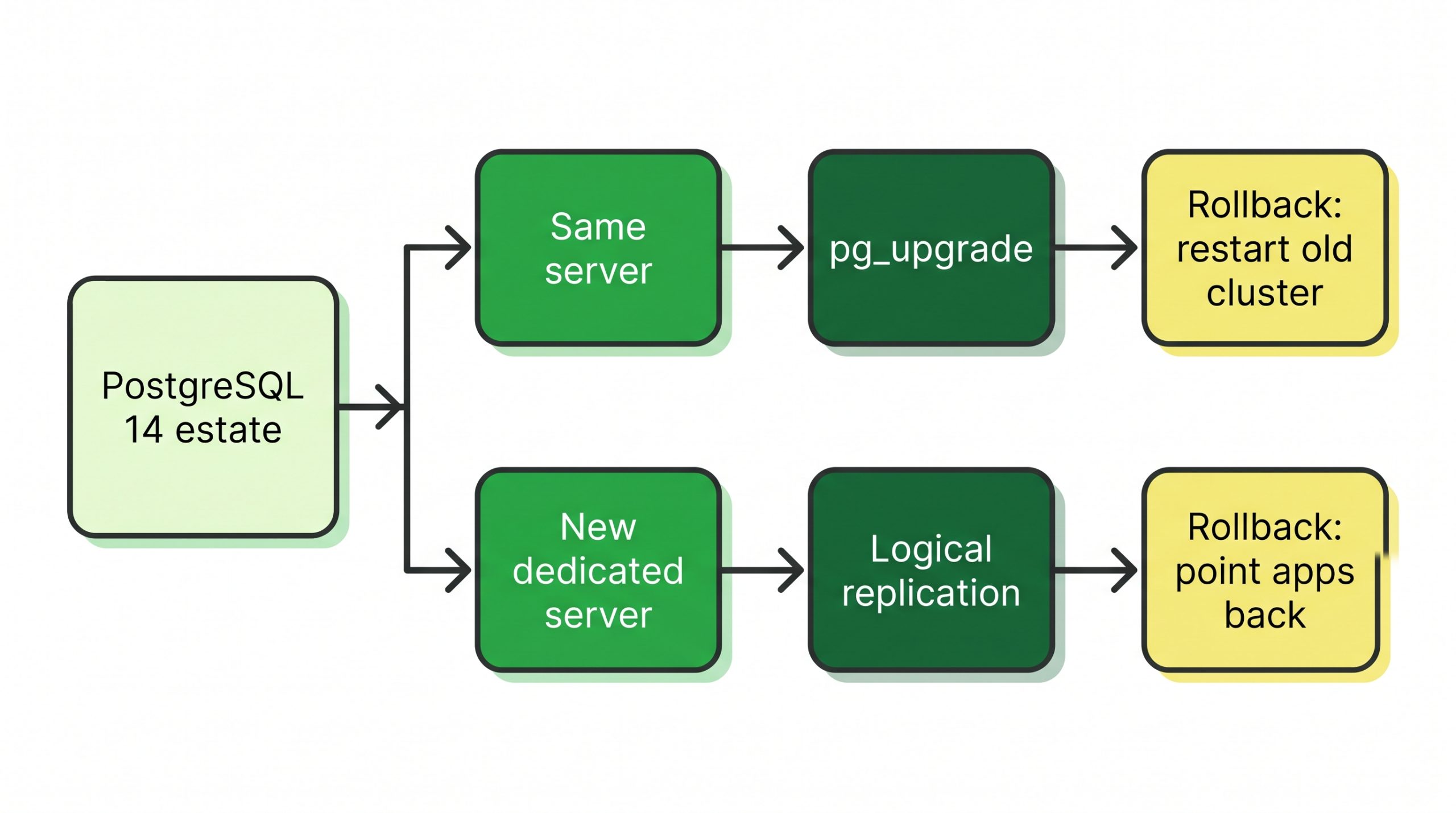
Figure 1. Two routes off a PostgreSQL 14 estate: pg_upgrade on the same server, where copy or clone mode leaves the old cluster restartable, or logical replication to a new dedicated server, where the way back is a point to test in rehearsal rather than a documented procedure.
Should You Move PostgreSQL to a New Dedicated Server During the Upgrade?
The documentation leaves room for both answers. The upgrading chapter says a logical replication standby can run on the same computer or a different one, so a new server can become the subscriber on the new version, while pg_upgrade works within one installation.
Is the new server sized from measurements of the 14 workload rather than from the old server’s specification? Our guide to sizing RAM, input/output operations per second (IOPS) and CPU for PostgreSQL works from the working set. Version 18’s asynchronous I/O subsystem, controlled by the io_method setting, changes how sequential scans, bitmap heap scans and vacuums issue reads; is there a pre-upgrade baseline to compare against?
On the RackBank side, we offer dedicated bare metal database servers.
Four scenarios, each with the question that decides the route:
- One PostgreSQL 14 database under an enterprise resource planning (ERP) or line-of-business application, with a weekend window: does the server have spare disk for copy mode, or a reflink-capable file system for clone mode? Go-live checks for ERP environments are covered in our ERP infrastructure readiness checklist.
- A server near refresh or short of disk: would a logical replication subscriber on a new dedicated server avoid a second copy of the data on the old one?
- A commercial bank under the RBI directions: does the technology refresh plan show PostgreSQL 14 replaced before EOS, in line with paragraphs 37 and 38?
- A database with large objects or many tables lacking a primary key: logical replication does not carry large objects, and tables without a primary key or other suitable unique index need replica identity FULL, which can make subscriber-side searches very inefficient. Is pg_upgrade the simpler route here?
WHAT TO VERIFY
|
Step-by-Step Cutover Plan for Upgrading from PostgreSQL 14
The pg_upgrade reference says the old cluster can be restarted if neither --link nor --swap was used; if the new cluster was started after linking, or swap reported the old cluster unsafe to start, the old cluster needs to be restored from backup. For logical replication, the upgrading chapter describes the switch-over but not a way back. How would the application return to 14, and what happens to writes made on the new primary after switch-over?
- 1. Rehearse on a copy: a recent backup restored to a test server, with
pg_upgrade --checkrun using the planned mode flag, or a trial subscription that confirms every published table has a replica identity. The run is timed. - 2. Build the target: the new version installed on the same server or the new one; for 18 with a 14 cluster that has no checksums, initialised with
--no-data-checksumsif pg_upgrade will be used. - 3. Sync and validate: for logical replication, the schema copied with
pg_dump --schema-only, a subscription created, and schema changes held, since DDL is not replicated. For pg_upgrade, the adjustments the check reported are worked through. - 4. Freeze writes and switch: the pg_upgrade reference says no one should access the clusters during the upgrade. For logical replication, writes stop and sequences on the subscriber are set to the latest values, since the restrictions page says sequences need to be updated if a switchover is intended, then applications are repointed.
- 5. Keep 14 as fallback: copy or clone mode leaves the old cluster unmodified. For logical replication, is there a tested path back to the 14 server?
- 6. Decommission after soak: statistics regenerated with
vacuumdb --all --analyze-in-stages --missing-stats-onlyand thenvacuumdb --all --analyze-only, and the old cluster deleted with the generated script once the upgrade is accepted.
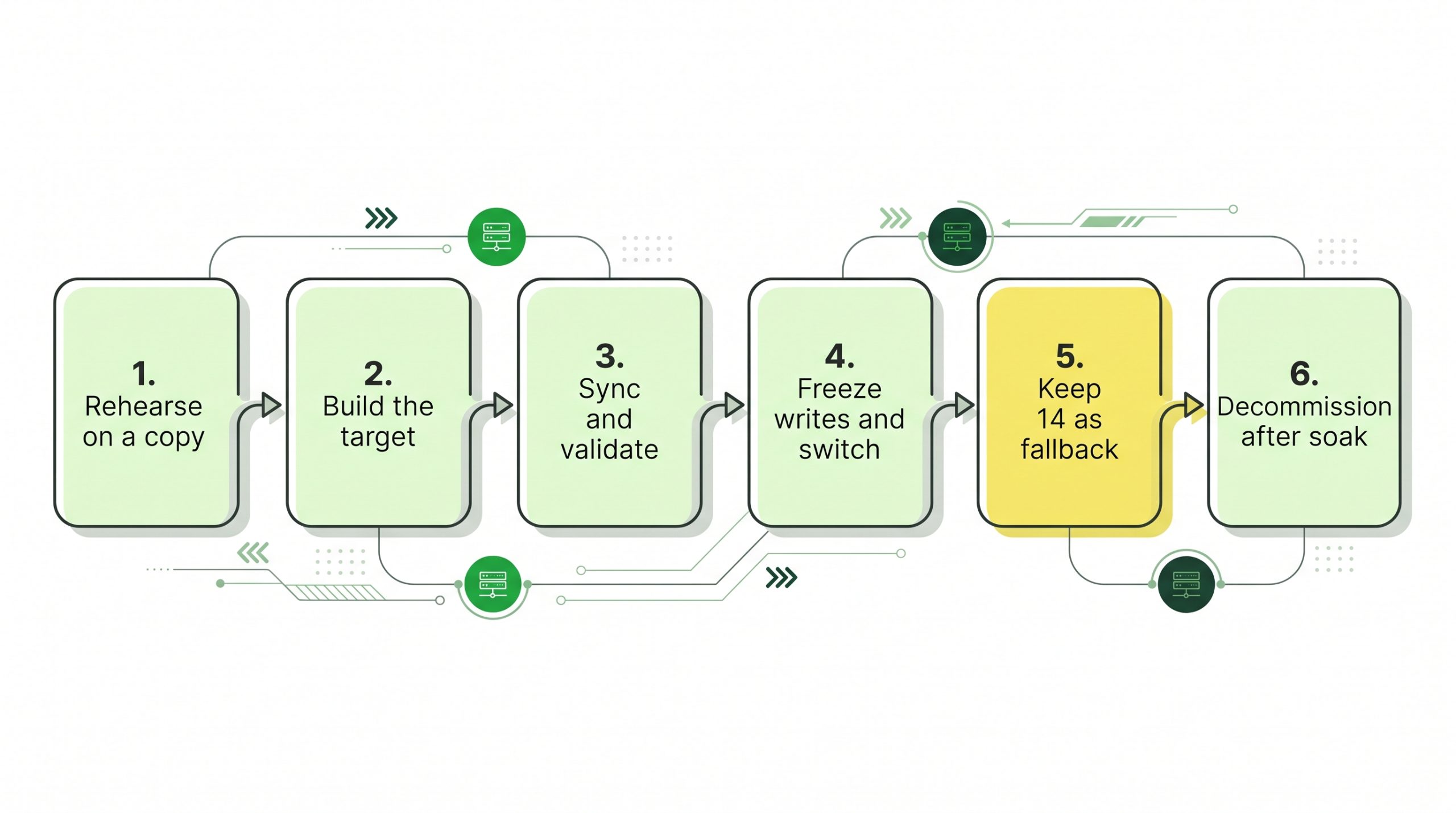
Figure 2. The six-step cutover sequence, with step 5 highlighted: in copy or clone mode the PostgreSQL 14 cluster stays restartable until decommissioning; for logical replication, the path back is a point to test in rehearsal.
The plan has limits. A rollback after 12 Nov 2026 returns the application to an unsupported version. Link and swap modes can remove the startable old cluster, which leaves a backup restore as the way back. And no cutover method fixes application code: the upgrading chapter notes that new major versions typically introduce user-visible incompatibilities that may need application changes, listed in each release’s migration section.
EVIDENCE TO REQUEST
|
| Criterion | Why it matters | What to verify |
|---|---|---|
| Target version | Sets the date of the next forced upgrade | Vendor certification for the chosen version |
| Cutover method | Decides downtime and preparation effort | Replica identity per table, large objects, downtime window |
| pg_upgrade mode | Decides whether PostgreSQL 14 can be restarted | Copy or clone chosen; file system supports reflink if clone |
| Checksums | pg_upgrade needs matching settings with 18 | Checksum state of the 14 cluster |
| Server sizing | The target must hold the workload to the next upgrade | Working set, IOPS and storage from measurements |
| EOS record | RBI directions, paragraphs 37 and 38, cover EOS monitoring and a refresh plan for commercial banks | Refresh plan entry with a completion date before EOS |
What the PostgreSQL 14 decision comes down to
For a self-hosted estate, the PostgreSQL 14 end of life upgrade comes down to three choices: a target version and its runway, a method that matches the server situation, and a cutover whose way back is known before switch-over. pg_upgrade in copy or clone mode leaves the old cluster restartable on the same server; logical replication can build the new version on a new dedicated server with a switch-over of several seconds, at the cost of more preparation. Has the cutover been rehearsed on a copy, and have the release notes of every skipped version been read?
| NEXT STEP If the upgrade is also the moment to move PostgreSQL onto new hardware, our bare metal options are set out on the dedicated database servers for PostgreSQL page. |
FAQs
Can I roll back from PostgreSQL 18 to 14 after pg_upgrade in link mode?
If the new cluster was never started, the pg_upgrade reference says the old cluster was unmodified apart from a .old suffix added to global/pg_control, and removing that suffix lets it restart. Once the new cluster has started, it has written to shared files and the old cluster needs to be restored from backup.
Does updating to 14.24 count as an upgrade for end of life purposes?
No. A minor update replaces binaries without a dump and restore, but support is tied to the major version, and 14 is supported until 12 Nov 2026 whatever its minor number. Moving to 15 or later needs pg_upgrade, a dump and restore, or logical replication.
Should I wait for PostgreSQL 19 instead of moving to 18?
As of 03 Nov 2026, version 19 is at release candidate stage and does not appear in the supported releases table, while 14 loses support on 12 Nov 2026. A move to 18 now keeps a supported version in production throughout, with 19 as a later, separate upgrade.